On this page
- 01How the Torrentio configure page works
- 02Providers: which sites Torrentio searches
- 03Sorting: how results are ordered
- 04Max results per quality
- 05Priority language
- 06Exclude resolutions (quality filter)
- 07Video size limit
- 08Debrid provider
- 09Best Torrentio settings (ready-made presets)
- 10How to install or update your configuration
- 11Configuration not working? Quick fixes
- 12FAQs
The Torrentio configure page is where you decide which streams Torrentio shows inside Stremio. It lives at torrentio.strem.fun/configure, it is free, and you do not need an account to use it. In this guide we explain every option on the page in plain English and give you ready-made presets you can copy.
Quick answer: open torrentio.strem.fun/configure, keep the general providers, choose By quality then seeders, set a priority language if you need one, exclude Cam and Screener, add a debrid key if you have one, then click Install and confirm in Stremio.
How the Torrentio configure page works
The page is split into seven groups: Providers, Sorting, Max results per quality, Priority language, Exclude resolutions, Video size limit and Debrid provider. At the bottom you will find two buttons: Install and Copy Link.
There is no “Save” button, because every choice you make is written into the addon link itself. For example, sorting by quality then size and showing five results per quality creates a link like torrentio.strem.fun/sort=qualitysize|limit=5/manifest.json. Stremio stores that link in your account, so the same settings follow you to every device where you log in.
This also means that to change a setting later you configure the addon again and reinstall it. We explain how in the update section below.
Providers: which sites Torrentio searches
Providers are the torrent indexes that Torrentio checks when you open a movie or episode. Version 0.0.15 lists 25 providers, grouped below:
| Group | Providers | Useful for |
|---|---|---|
| General | YTS, EZTV, RARBG, 1337x, EXT, ThePirateBay, KickassTorrents, TorrentGalaxy, MagnetDL | Movies and TV series in English |
| Anime | HorribleSubs, NyaaSi, TokyoTosho, AniDex, nekoBT | Anime series and films |
| Russian | Rutor, Rutracker | Russian audio releases |
| Portuguese | Comando, BluDV, MicoLeaoDublado | Portuguese and Brazilian dubs |
| French / Italian | Torrent9 / ilCorSaRoNeRo | French and Italian audio |
| Spanish | MejorTorrent, Wolfmax4k (Spain), Cinecalidad (Latino) | Castilian and Latin American Spanish |
| Polish | BestTorrents | Polish releases |
More providers give you more results, but also a longer list to scroll. A good rule is to keep the general providers and add only the providers for your own language. RARBG closed in 2023, so it can only return older releases.
Sorting: how results are ordered
| Option | What it does | Best for |
|---|---|---|
| By quality then seeders (default) | Groups results by quality, then puts the files with the most seeders first. | Free P2P streaming, because more seeders usually means a faster start. |
| By quality then size | Groups results by quality, then orders files of the same quality by size. | Debrid users who want the highest bitrate. |
| By seeders | Ignores quality groups and shows the most seeded files first. | Slow or unstable connections. |
| By size | Orders all results by file size. | Finding small files for phones or mobile data. |
Max results per quality
This number limits how many streams Torrentio shows for each quality (4K, 1080p, 720p and so on). Leave it empty to see everything, or type 3–5 to keep the list short and easy to read on a TV remote.
Priority language
Torrentio can move releases in your language to the top of the list. The page offers more than 40 languages, including Spanish, Latino, Portuguese, French, German, Italian, Russian, Hindi, Telugu, Tamil, Arabic, Turkish, Polish, Japanese, Korean and Chinese.
- It only changes the order of results; it does not translate audio or add subtitles.
- It works best together with a matching provider (for example Spanish + MejorTorrent or Cinecalidad).
- Always check the release name or language flag before you press play.
Exclude resolutions (quality filter)
Tick the boxes for qualities you never want to see. The options are BluRay REMUX, HDR/HDR10+/Dolby Vision, Dolby Vision, Dolby Vision + HDR, 3D, Non 3D, 4k, 1080p, 720p, 480p, Other (DVDRip/HDRip/BDRip…), Screener, Cam and Unknown.
- Always exclude Cam and Screener. These are low-quality recordings.
- Slow internet or older device: also exclude 4k and BluRay REMUX, because these files are very large.
- TV without Dolby Vision: exclude the Dolby Vision options, as these files can show wrong colours on screens that do not support them.
- Do not tick “Non 3D” unless you only want 3D files; the page itself warns you about this.
Video size limit
Type a maximum file size such as 2GB or 500MB, and Torrentio hides anything larger. This is handy on phones, mobile data and slow Wi-Fi. Leave it empty if you use a debrid service and a fast connection.
Debrid provider
By default Torrentio uses free P2P streaming. If you pay for a debrid service you can connect it here. The supported providers are RealDebrid, Premiumize, AllDebrid, DebridLink, EasyDebrid, Offcloud, TorBox, Put.io and HighWay.
After you choose a provider, an API key field appears with a “Find API Key” link, plus two options: Don't show download to debrid links (hides files that are not cached yet) and Don't show debrid catalog (hides the debrid catalog in Stremio). Our Torrentio Real-Debrid setup guide walks through this step by step.
Keep your link private: your debrid API key becomes part of your addon link. Do not share the link or screenshots of it.
Best Torrentio settings (ready-made presets)
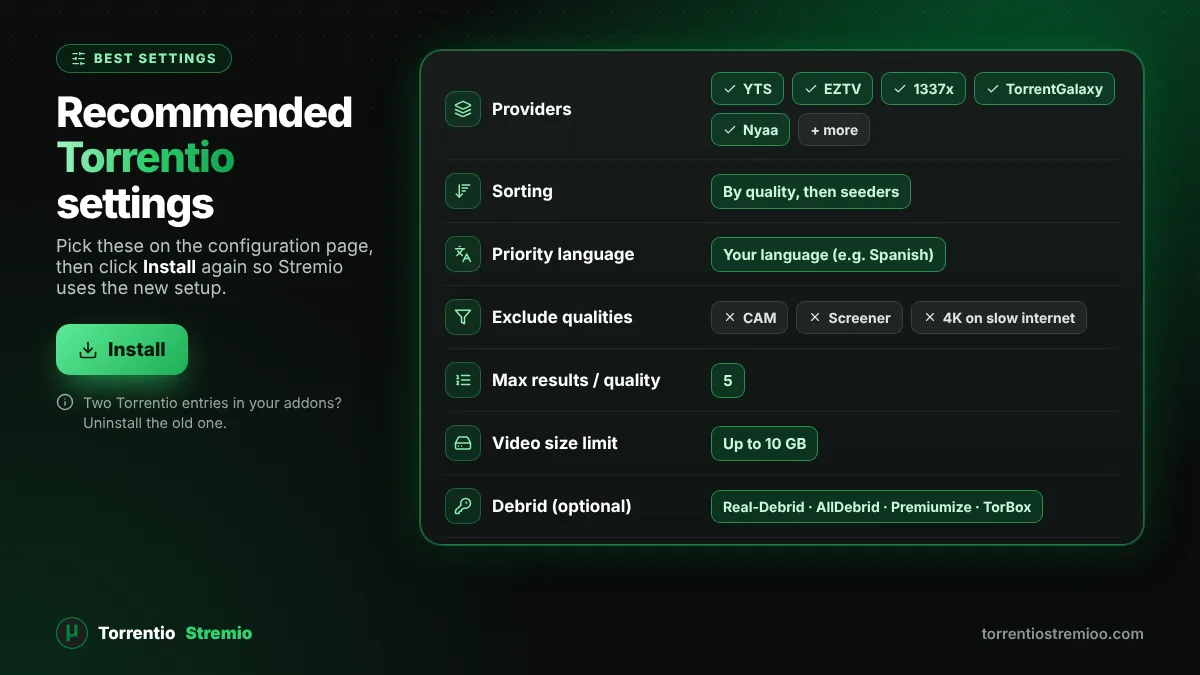
| Your situation | Sorting | Exclude | Max results | Size limit |
|---|---|---|---|---|
| Phone or slow internet | By quality then seeders | 4k, BluRay REMUX, Cam, Screener | 3 | 2GB |
| 1080p TV on home Wi-Fi | By quality then seeders | Cam, Screener, 3D | 5 | Empty |
| 4K TV with debrid | By quality then size | Cam, Screener, 480p | 5 | Empty |
| Anime fans | By quality then seeders | Cam, Screener | 5 | Empty |
| Spanish audio | By quality then seeders | Cam, Screener | 5 | Empty |
For anime, make sure NyaaSi, TokyoTosho, AniDex, nekoBT and HorribleSubs are selected. For Spanish, add MejorTorrent and Wolfmax4k (Spain) or Cinecalidad (Latino) and set the priority language to Spanish or Latino.
How to install or update your configuration
- Finish your settings and click Install. Your browser asks to open Stremio; allow it.
- In Stremio, click Install again to confirm.
- If the button does not open Stremio, click Copy Link and paste the link into the search box in Stremio's Add-ons screen.
- To change settings later, configure again, install the new version, then open Add-ons › Installed and uninstall the old Torrentio entry if you see two.
Need more help with installation? Read our full guide on how to install Torrentio on Stremio.
Configuration not working? Quick fixes
- No results: you may have excluded too much. Remove the size limit and untick some resolutions.
- Old settings still active: you probably have two Torrentio addons installed. Remove the older one.
- Debrid links missing: check that your API key is correct and your subscription is active.
- Nothing loads at all: the service may be down. Check our live Torrentio status checker.
New to Torrentio? Start with our complete Torrentio Stremio guide.
Frequently Asked Questions
Where is the Torrentio configure page?
The official configure page is at torrentio.strem.fun/configure. You can also open torrentio.strem.fun, which shows the same settings.
Do I need an account to configure Torrentio?
No. Torrentio itself has no accounts. You only need a free Stremio account so your configured addon syncs to all your devices.
Can I change Torrentio settings without reinstalling?
No. Your settings are saved inside the addon link, so you need to configure again, install the new link and remove the old Torrentio entry.
What is the best sorting option in Torrentio?
“By quality then seeders” is best for free P2P streaming. “By quality then size” is better for debrid users who want the highest bitrate.
Is my debrid API key safe in Torrentio?
The key is stored in your personal addon link. Keep that link private and do not share screenshots of it. If you think it leaked, create a new key on your debrid website and reconfigure Torrentio.