Torrentio Stremio is one of the most popular setups for people who use the free Stremio media center. Stremio is the app where you browse and play movies and TV series, and Torrentio is a third-party addon that finds streaming sources for those titles. In this guide, you will learn what Stremio and Torrentio are, how the Stremio Torrentio addon works, how to install it step by step on PC, Android and Android TV, the best settings, how to fix common errors, and whether it is safe and legal to use.
On this page
- 01Install Torrentio Addon (Direct Links)
- 02What is Stremio?
- 03What is Torrentio?
- 04How Does Torrentio Stremio Work?
- 05Torrentio Stremio Overview
- 06How to Install Stremio
- 07How to Install Torrentio on Stremio (Step by Step)
- 08How to Install Torrentio on Stremio Android, Android TV and Firestick
- 09How to Configure Torrentio (Best Settings)
- 10Torrentio Stremio en Español: Spanish Audio and Subtitles
- 11Main Features of Torrentio Stremio
- 12Advantages of Torrentio Stremio
- 13Disadvantages of Torrentio Stremio
- 14Torrentio Not Showing Up or Not Working on Stremio? Fixes
- 15Is Torrentio Stremio Safe and Legal?
- 16Torrentio Alternatives for Stremio
- 17Torrentio Guides & Tutorials
- 18FAQs about Torrentio and Stremio
- 19Conclusion
Install Torrentio Addon (Direct Links)

Click Install in Stremio to add Torrentio to your Stremio app in one step. Don't have Stremio yet? Download the app first from the official website, or use Stremio Web in your browser.
https://torrentio.strem.fun/manifest.jsonTorrentio is an addon, not an app — there is no Torrentio APK or EXE file. These buttons only add the official addon link to your Stremio account. Need help? Follow our step-by-step install guide.
What is Stremio?
Stremio is a free media center app that lets you discover, organize and watch video content in one place. Stremio does not host movies or TV shows itself. Instead, it uses Stremio addons, small plugins that add catalogs, details, subtitles and streaming sources to the app. Its default catalog shows posters, descriptions, ratings and episode lists, and you can add titles to your library and continue watching where you left off.
Stremio is available for Windows, macOS, Linux, Android, Android TV, iOS and some smart TVs, and it also runs in a web browser as Stremio Web. Your free Stremio account syncs your addons and library, so you only need to set things up once.
What is Torrentio?
Torrentio is a free, community-made addon for Stremio. It is not an official Stremio feature, and it does not host any movies or TV shows. When you open a title in Stremio, Torrentio searches torrent indexes such as YTS, EZTV, 1337x, ThePirateBay, TorrentGalaxy and Nyaa, and returns a list of matching streams.
Each result shows useful details such as video quality (4K, 1080p, 720p), file size, number of seeders and the source provider, so you can choose the best option for your device and internet speed. Torrentio for Stremio (sometimes called the Torrentio plugin) can work in two ways:
Free P2P mode
Streams play directly from the torrent network, so speed depends on how many seeders a file has.
Debrid mode
You connect a debrid service such as Real-Debrid, AllDebrid, Premiumize, DebridLink, Offcloud, TorBox or Put.io, and cached files stream from the debrid server like a normal online video.
How Does Torrentio Stremio Work?
Once the Torrentio addon is installed, everything happens inside the Stremio app:
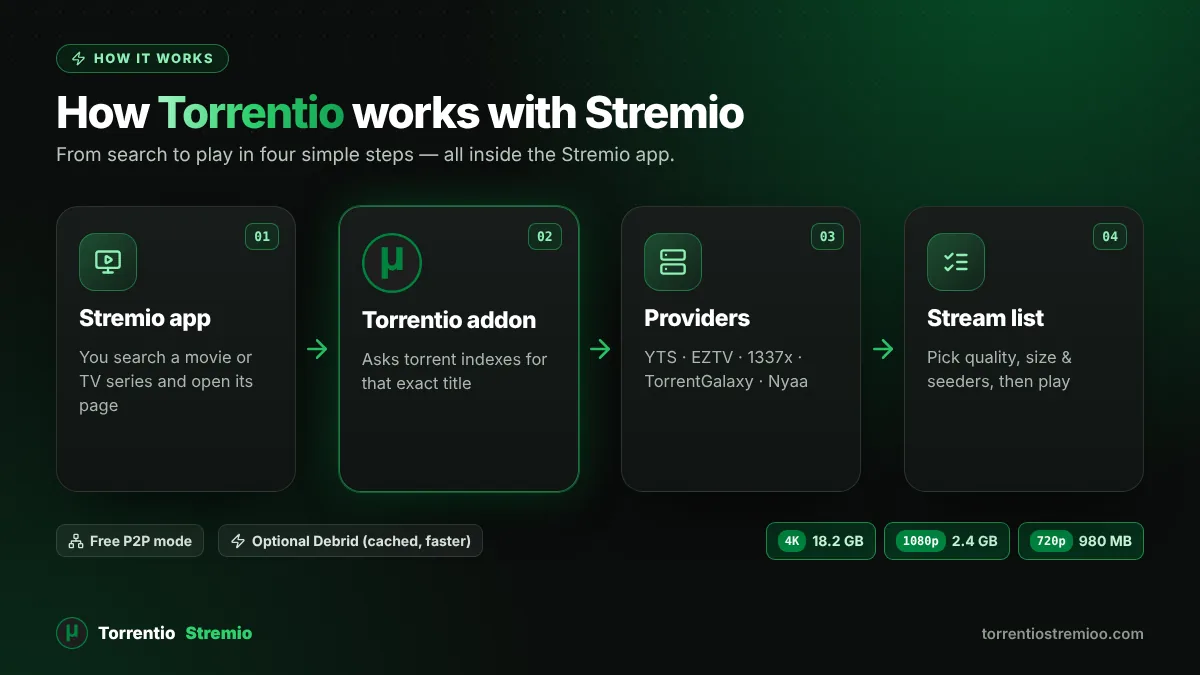
- 1Search a title
Open Stremio and search for a movie or TV series, or browse the catalog.
- 2Open the title page
Open the title's page. For a series, choose the season and episode.
- 3Torrentio finds streams
Stremio asks all your installed addons for streams, and Torrentio replies with a list of results for that exact title.
- 4Compare the results
Each result shows the quality, file size, seeders and provider. Results with more seeders usually start faster.
- 5Press play
Choose a stream, and Stremio plays it in its built-in player.
- 6Fix buffering
If the video buffers, choose a lower quality or a result with more seeders, or check your internet connection.
Torrentio Stremio Overview
| Details | Information |
|---|---|
| Name | Torrentio |
| Type | Third-party Stremio addon (torrent stream finder) |
| Works with | Stremio app on PC, Mac, Linux, Android, Android TV and Stremio Web |
| Content | Movies, TV series and anime |
| Configuration page | torrentio.strem.fun |
| Addon link (manifest URL) | https://torrentio.strem.fun/manifest.json |
| Version | v0.0.15 |
| Providers | YTS, EZTV, 1337x, ThePirateBay, TorrentGalaxy, KickassTorrents, MagnetDL, Nyaa, Rutor, MejorTorrent, Cinecalidad and more |
| Video quality | 4K, 1080p, 720p and lower, depending on available sources |
| Language options | Priority foreign language setting (Spanish, Portuguese, French, Italian, Russian and more) |
| Debrid support | Real-Debrid, AllDebrid, Premiumize, DebridLink, Offcloud, TorBox, Put.io, EasyDebrid (optional) |
| Price | Free (debrid services are paid) |
| Account | Free Stremio account recommended to sync addons across devices |
| Developer | Independent developer, not part of Stremio |
| Safety note | Stream only content you have the right to watch |
How to Install Stremio
You need the Stremio app before you can add Torrentio. Installing Stremio is easy:
- 1
Go to the official Stremio website (stremio.com) and open the Downloads page. On Android phones and Android TV, you can also install Stremio from the Google Play Store.
- 2
Choose the version for your device: Windows, macOS, Linux, Android or Android TV. If you don't want to install anything, you can use Stremio Web in your browser.
- 3
Install and open the app.
- 4
Create a free account, or log in if you already have one.
- 5
Open the Add-ons section. You will see the official addons that come installed by default. Now you are ready to add Torrentio.
How to Install Torrentio on Stremio (Step by Step)
There are three easy ways to add Torrentio to Stremio. Method 1 is the best, because it lets you configure the addon before you install it. Spanish users often search for “cómo instalar Torrentio en Stremio” — the steps below are the same in every language.
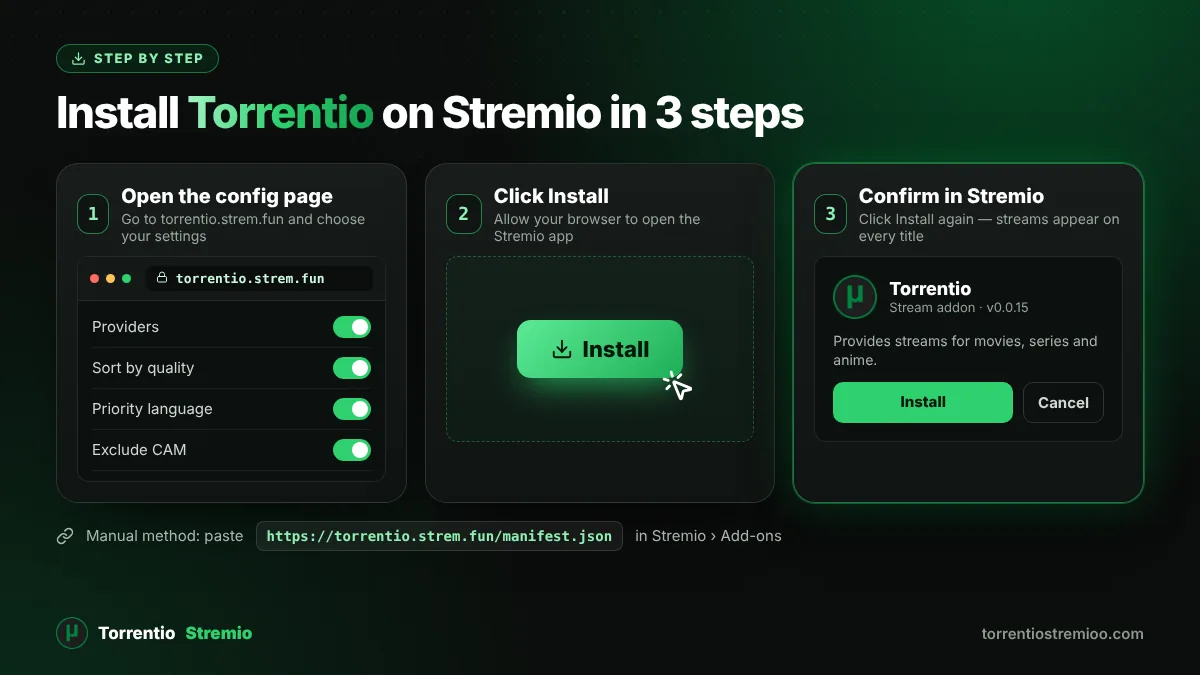
Method 1: Install Torrentio from the Official Configuration Page
- 1
Open the Stremio app on your device and keep it running.
- 2
In your browser, go to torrentio.strem.fun.
- 3
Choose your settings: providers, sorting, priority language, qualities to exclude and (optional) your debrid service. You can also skip this and keep the default settings.
- 4
Click Install. Your browser will ask to open Stremio — allow it.
- 5
Stremio shows the Torrentio addon window. Click Install again.
- 6
Open any movie or series. Torrentio streams now appear in the stream list.
Method 2: Add Torrentio from Stremio's Community Add-ons
- 1
Open Stremio and click the Add-ons (puzzle piece) icon.
- 2
Switch from Official to Community add-ons.
- 3
Search for Torrentio.
- 4
Click Install.
This method installs Torrentio with its default settings. To change them later, configure the addon on torrentio.strem.fun and install it again.
Method 3: Paste the Torrentio Addon Link (Manifest URL)
- 1
Copy the Torrentio addon link:
https://torrentio.strem.fun/manifest.jsonor the custom link created after you configure the addon. - 2
In Stremio, open Add-ons and paste the link into the addon search / URL box.
- 3
Press Enter and click Install.
This method is useful when the Install button on the website does not open the Stremio app.
How to Install Torrentio on Stremio Android, Android TV and Firestick
The Torrentio Stremio Android setup works the same way as on a computer. On TVs, the easiest method is to install Torrentio once on your phone or computer and let your Stremio account sync it:
- 1
Install Stremio on your Android phone, Android TV or Fire TV device. Android and Android TV users can get it from the Google Play Store; on Fire TV devices, many users install the Android version from Stremio's official download page.
- 2
Log in with the same Stremio account you use on your phone or PC.
- 3
Install Torrentio on any device using Method 1 above.
- 4
Restart Stremio on your TV. Torrentio appears automatically, because addons sync with your account.
Typing a long addon link with a TV remote is slow, so syncing through your account saves a lot of time.
How to Configure Torrentio (Best Settings)
The Torrentio configuration page lets you control which results you see. These are the main options:
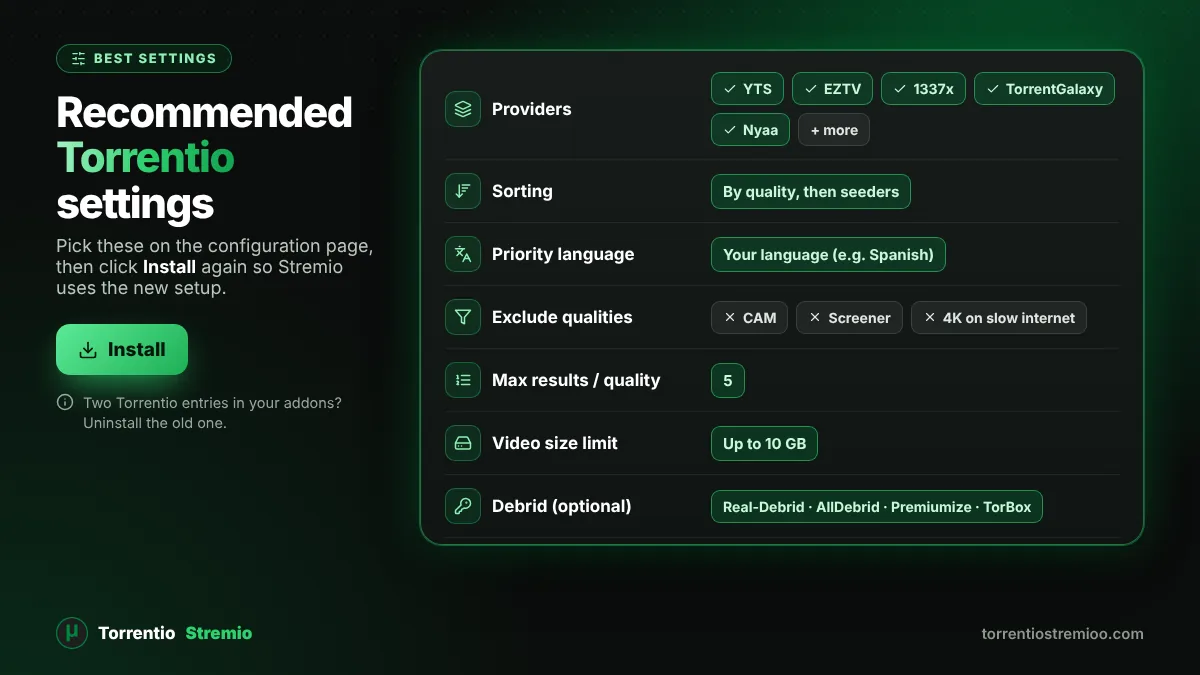
Providers
Choose which torrent sites Torrentio searches. Selecting several providers gives you more results.
Sorting
Sort results by quality, seeders or file size. Sorting by quality and then seeders is a good choice for P2P streaming.
Priority foreign language
Moves streams in your language to the top of the list.
Exclude qualities / resolutions
Hide 4K if your device or internet can't handle it, or hide low-quality CAM and screener releases.
Max results per quality
Keeps the stream list short and easy to read.
Video size limit
Hides very large files that take long to load.
Debrid provider
Add the API key from your debrid account to get faster, cached links.
After you change any setting, click Install again so Stremio uses the new configuration. If you see two Torrentio entries in your addons, uninstall the old one.
Torrentio Stremio en Español: Spanish Audio and Subtitles
If you want movies and series in Spanish (castellano or latino), set Priority foreign language to Spanish in the Torrentio configuration and enable Spanish-language providers such as MejorTorrent, Wolfmax4k and Cinecalidad. Spanish results will then appear at the top of the list.
Keep in mind that the audio language depends on each file, so check the language flag or release name before you press play. Stremio also supports subtitles, so you can choose Spanish subtitles from the player menu when they are available.
Main Features of Torrentio Stremio
Source Discovery
Torrentio searches many torrent providers at once. When you open a movie or TV show in Stremio, it collects matching sources and shows them in one list, so you don't need to visit torrent websites yourself.
Multiple Results with Details
Popular titles usually have many results, while new or rare titles may have only one or two. Each result shows the quality, file size, seeders and provider, which makes it easy to compare options.
Quality Information
Results are grouped by quality, such as 4K, 1080p and 720p. You can choose a higher quality on a fast connection, or a smaller file if your internet is slow or your device has limited storage.
Stremio Integration
Torrentio works directly inside Stremio's interface. You search, choose a stream and watch in the same app, without pop-ups or ads from external websites.
Language Preferences
Torrentio can prioritize streams in your preferred language. However, not every title is available in every language, so always check the audio language before playing.
Movies, TV Series and Anime Support
Torrentio supports movies, TV series and anime, including dedicated anime providers. Availability still depends on whether a torrent exists for that title and has enough seeders.
Debrid Support
Torrentio works with popular debrid services. With debrid, cached streams start faster and you don't share data over the P2P network.
Advantages of Torrentio Stremio
Free to Use
Both Stremio and the Torrentio addon are free. You only pay if you choose to add an optional debrid service.
Wide Content Selection
Because Torrentio searches many providers at the same time, you usually get more stream options than with a single source.
Easy Stremio Integration
After a one-time install, Torrentio streams appear on every movie and episode page in Stremio. There is nothing extra to open.
Different Video Quality Options
You can choose between 4K, 1080p, 720p and lower qualities based on your internet speed, screen size and storage.
Customization Options
The Torrentio configuration page lets you choose providers, sorting, language priority, quality filters and debrid settings, so the results match your needs.
Syncs Across Devices
Install Torrentio once, and it appears on every device where you log in with the same Stremio account.
Disadvantages of Torrentio Stremio
Third-Party Addon
Torrentio is not an official Stremio feature. This means its availability, maintenance and compatibility can change, and there is no official Stremio support if it stops working.
Unreliable Sources
Not every torrent is reliable. Some files are mislabeled, low quality or no longer seeded. Choose results with more seeders and skip files that look suspicious.
Privacy in P2P Mode
Without a debrid service, Torrentio streams over the P2P network, where your IP address is visible to other users sharing the same file.
Internet Connection Required
A stable, fast internet connection is needed for searching, loading streams and watching in HD or 4K.
Setup Can Be Confusing
For new users, addon links, configuration options and debrid settings can be confusing at first. Once you complete the setup, Torrentio is easy to use.
Content Availability Is Not Guaranteed
Torrentio can only show what exists on its providers. Some titles have no results, few seeders or no version in your language.
Torrentio Not Showing Up or Not Working on Stremio? Fixes
If Torrentio is not showing results, keeps saying “still loading”, or fails to install, try these fixes:
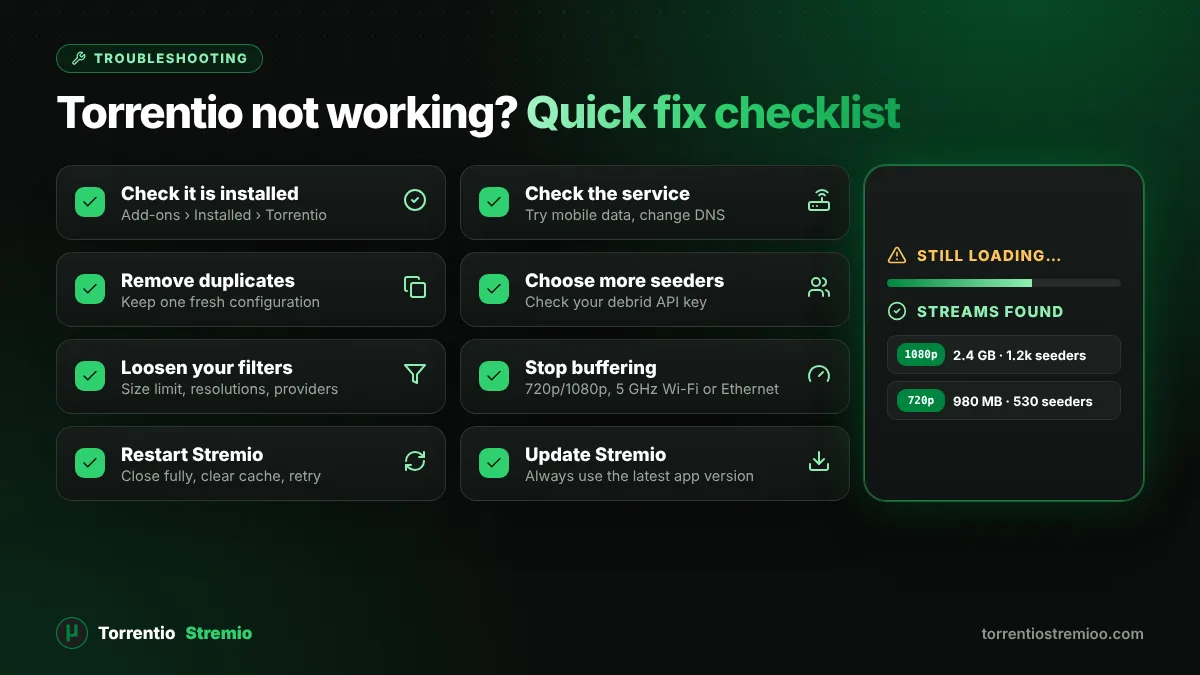
Check that it is installed
Open Add-ons, then Installed, and look for Torrentio. If it is missing, install it again from torrentio.strem.fun.
Remove duplicates
Uninstall any extra Torrentio entries and install one fresh configuration.
Loosen your filters
Remove the video size limit, stop excluding common resolutions and enable more providers.
Restart Stremio
Fully close and reopen the app, clear its cache, or test the same account on another device.
Check the service
Open torrentio.strem.fun in your browser. If it opens on mobile data but not on your home Wi-Fi, your network or DNS may be blocking it; try changing your DNS or restarting your router. If it doesn't open anywhere, the service may be temporarily down, so wait and try again later.
Streams appear but won't play
Choose a result with more seeders. If you use debrid, check that your subscription is active and your API key is correct.
Buffering
Choose 1080p or 720p, use 5 GHz Wi-Fi or an Ethernet cable, and free up storage on your device.
Is Torrentio Stremio Safe and Legal?
Stremio is a legal, free app, and Torrentio is just software: it does not host any files, it only lists torrents found on public websites. Whether using it is legal depends on what you watch. Many torrents on public sites are copyrighted movies and shows shared without permission, and streaming or downloading them may be illegal in your country. Use Torrentio only for content you have the right to watch, such as public-domain or freely licensed videos.
Follow these safety tips:
- Install Torrentio only from torrentio.strem.fun or from inside Stremio. There is no official Torrentio APK or EXE file, so avoid websites that offer a “Torrentio download”.
- Remember that in P2P mode your IP address is visible to other peers.
- Choose results with many seeders and clear release names, and skip suspicious files.
- Keep the Stremio app updated.
Important: this website is only an informational guide. Always respect copyright laws in your country.
Torrentio Alternatives for Stremio
If Torrentio is down or doesn't show enough results, some users try other stream addons such as Comet or MediaFusion. Like Torrentio, these are third-party addons, so the same legal and safety rules apply.
Torrentio Guides & Tutorials
Step-by-step guides for every Torrentio setup: configuration, Real-Debrid, Fire TV, live status and more.
 November 15, 2026Stremio for PC: Free Download for Windows, Mac & Linux (2026 Guide)Download Stremio for PC free on Windows, Mac or Linux. Pick the right Stremio 5 file, install it step by step, add Torrentio and fix common desktop errors.Read guide
 November 11, 2026What Is Stremio? How It Works, Is It Free & Is It Worth It (2026)A plain-English explainer of Stremio: what it is, who makes it, how addons and the streaming server work, which devices it runs on, what Supporter plans cost and whether it is worth using.Read guide
 November 9, 2026Stremio APK: Free Download of the Latest Official Version (2026)Get the official Stremio APK for Android phones and Android TV, pick the right ARM64 or ARM file, install it safely and fix common install errors.Read guide
 November 7, 2026Stremio Alternative: 8 Best Apps Like Stremio in 2026 (Free & Paid)The 8 best Stremio alternatives in 2026 compared: Nuvio, Kodi, CloudStream, Syncler, Plex, Jellyfin, Emby and Infuse, with prices and platforms.Read guide
 November 5, 2026Stremio Not Working? 17 Proven Fixes for Every Device (2026)Stremio not working? Find the real cause in two minutes, then fix no streams, buffering, black screens and server errors on any device.Read guide
 November 3, 2026Stremio Subtitles: How to Add, Sync and Fix Them (2026 Guide)How to turn on Stremio subtitles, set a default language, fix timing with G and H, add your own .srt file and choose the best subtitle addons.Read guide
FAQs about Torrentio and Stremio
Does Torrentio host movies?
No. Torrentio does not host or upload any movies or shows. It only finds torrent sources on public sites and shows them inside Stremio.
Is Torrentio free?
Yes. Torrentio and Stremio are both free. Debrid services such as Real-Debrid are optional and paid.
Is there a Torrentio APK or download?
No. Torrentio is an addon, not a separate app. You install it with a link from torrentio.strem.fun or from Stremio's add-on catalog.
Can I use Torrentio on Stremio Android?
Yes. Install Stremio on your Android phone or Android TV, log in, and install Torrentio using any method in this guide. If Torrentio is already installed on your account, it syncs automatically.
Does Torrentio work on Stremio Web?
Yes. Addons installed on your account also appear in Stremio Web. To play P2P torrent streams in the browser, Stremio Web usually needs the Stremio streaming server (included with the desktop app) running on your device.
Why is Torrentio not showing any results?
The most common reasons are strict filters, a broken or duplicate install, a network or DNS block, or a temporary outage. Follow the fixes in the troubleshooting section above.
Do I need Real-Debrid for Torrentio?
No. Torrentio works without debrid in P2P mode. Real-Debrid or another debrid service is optional and gives faster, cached streams.
Does Torrentio require a VPN?
No, a VPN is not required to install or use Torrentio. Many users still use one for privacy in P2P mode, or when their internet provider blocks the addon. A VPN does not make watching unauthorized content legal.
How do I update or remove Torrentio?
To change settings, configure Torrentio again on torrentio.strem.fun and click Install. To remove it, open Add-ons, then Installed, select Torrentio and click Uninstall.
Conclusion
Torrentio and Stremio work together: Stremio is the app where you browse and play movies, TV series and anime, and Torrentio is the addon that finds streaming sources for each title, with quality options from 4K to 720p. You can install Torrentio on Stremio in a few minutes from torrentio.strem.fun, configure providers, language and quality, and use it on PC, Android and Android TV with the same account.
Before you use it, remember that Torrentio is a third-party addon, results are not guaranteed, and the legal responsibility for what you stream is yours. Stick to content you have the right to watch, choose reliable sources, and adjust video quality to match your internet connection.