On this page
- 01What is Stremio? The short answer
- 02Stremio meaning in plain words
- 03Who makes Stremio?
- 04How does Stremio work?
- 05The main types of Stremio addons
- 06Default addons in a fresh Stremio install
- 07What is Stremio's streaming server?
- 08Is Stremio free? Yes, with optional Supporter plans
- 09Stremio account, sync and guest mode
- 10What devices does Stremio work on?
- 11What is Stremio used for?
- 12What Stremio is not
- 13What is Stremio compared with Netflix?
- 14Stremio vs Kodi in brief
- 15Pros and cons of Stremio
- 16Is Stremio legal and safe?
- 17Who is Stremio for?
- 18Is Stremio worth it in 2026?
- 19Getting started with Stremio in five steps
- 20Final words
- 21FAQs
What is Stremio, and why does it come up every time someone talks about Torrentio? Stremio is a free media center app that collects movies, series and channels from addons and shows them in one clean library. This guide explains who makes it, how its addon system and streaming server work, which devices it runs on, what the new Supporter plans cost, and whether it is worth your time. We checked Stremio's official website, downloads page, Supporter plans page and Google Play listing on November 9, 2026.
Quick answer: what is Stremio? It is a free media center for Windows, macOS, Linux, Android, Android TV, smart TVs, VR headsets and the web. It has no movies of its own: addons supply the catalogs, streams and subtitles, and a free account syncs your library across devices. The basic app is free forever, and optional Supporter plans (from $39.99 per year) only add experimental extras.
Visit the Official Stremio Website
What is Stremio? The short answer
What is Stremio in one sentence? It is a media center: an app that brings video from many sources into one place, with posters, descriptions, a library and a built-in player. Its official tagline is "Freedom to Stream", and the website describes it as a modern media center for watching what you choose.
The most important point is that Stremio does not own or host any movies. Everything you can play comes from addons, which are small online services made by the Stremio team or by independent developers. Without addons, Stremio is like a new TV with no channels tuned in.
With the right addons, you can watch movies, series, web channels, TV channels, sports and podcasts. Stremio's own FAQ lists all of these, and it makes clear that what you see depends on the addons you install.
Stremio meaning in plain words
People who look up the Stremio meaning, or type "what is Stremio" into Google, usually want to know one thing: is it a website, a streaming service or an app? It is an app. You install it, or open it in a browser, and it plays video from sources you choose. Three words sum it up:
- Media center: one app to browse, organize and play video, like a TV guide and a video player in one.
- Addons: plug-ins that add content lists, video links and subtitles.
- Sync: your addons, library and watch progress follow your account to every device.
So what is Stremio, really? The app is the player and the organizer. The addons are the sources. Once this idea clicks, every menu in Stremio makes sense.
Who makes Stremio?
Part of answering "what is Stremio?" is knowing who builds it. Stremio's Google Play listing names the developer as Stremio, and its "About the developer" section lists Smart Code OOD, based in Sofia, Bulgaria. The official terms simply call the operator "the Stremio organization", and Wikipedia dates the first official release to February 2015.
Large parts of Stremio are open source. The desktop app and the Stremio organization on GitHub are public, so anyone can read the code. The official technology page lists the building blocks, including Qt, the mpv and libVLC players, Node.js, Rust, Kotlin for the Android apps, Swift for the Apple apps and React for Stremio Web.
Stremio is funded by its community, not by selling content. The team builds the app and the official addons, while independent developers build most other addons.
How does Stremio work?
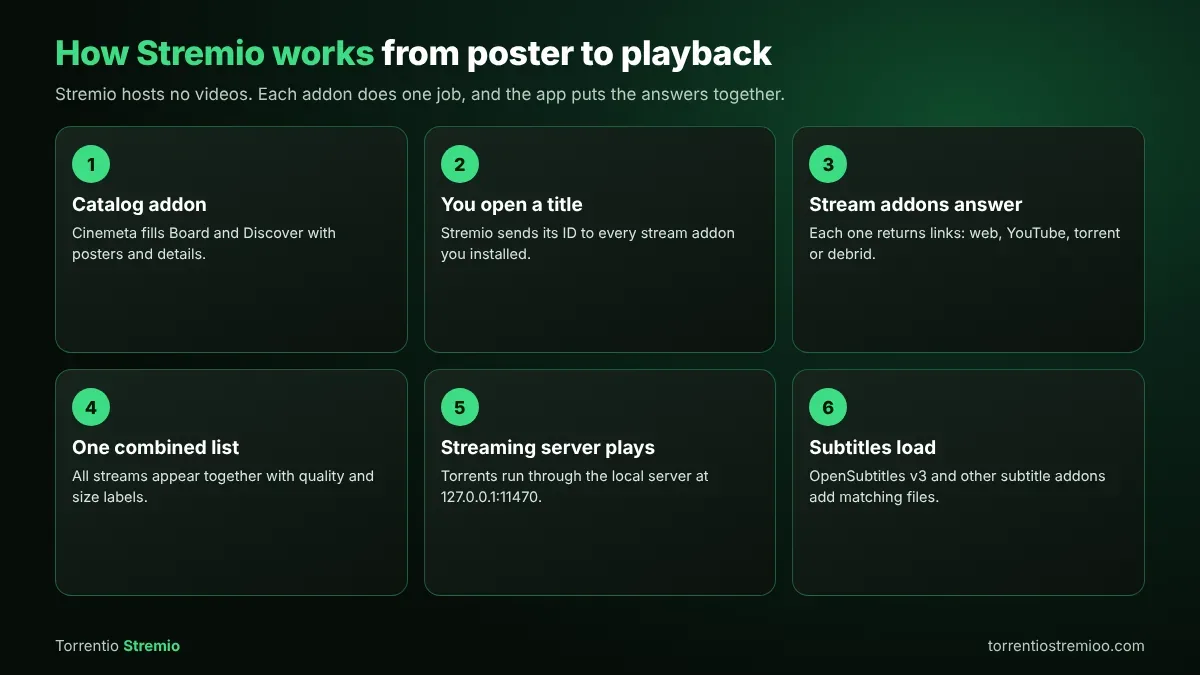
Once you know the answer to "what is Stremio?", the next question is how it works. Stremio acts like a search hub: when you open a title, it asks every installed addon whether it has something for that title, then shows all the answers in one list. Here is what happens when you press play:
- A catalog addon fills the home screen. In a fresh install, Cinemeta shows posters, ratings and descriptions on the Board and Discover pages.
- You open a movie or an episode. Stremio sends the title's ID to all your stream addons at the same time.
- Each stream addon answers. It returns the links it knows: direct web links, YouTube videos, torrents or debrid links.
- Stremio shows one combined list. Each addon adds its own labels, such as quality, size and source.
- You pick a stream. The built-in player starts it, and torrent streams run through the streaming server on your device.
- Subtitles appear. Subtitle addons, such as OpenSubtitles v3, offer matching subtitle files inside the player.
All of this takes a second or two. Because every job is done by a separate addon, you can swap any part without changing the app.
The main types of Stremio addons
You cannot answer "what is Stremio?" without addons. Stremio's official addon SDK describes an addon as a small web service that answers a few simple requests. One addon can provide several types of resources, and these are the four you will meet most:
| Addon type | What it does | Examples |
|---|---|---|
| Catalog | Lists titles for the Board and Discover pages | Cinemeta, YouTube |
| Meta (details) | Posters, descriptions, cast, seasons and episodes | Cinemeta |
| Stream | Playable video links for a title | Public Domain Movies, Torrentio |
| Subtitles | Subtitle files in many languages | OpenSubtitles v3 |
The key safety point: addons are web services, not programs. Stremio says its addons do not run any code on your device, and the SDK notes that Stremio never runs an addon's code. Your app only sends a request and receives a list back.
You install an addon by clicking its install button or pasting its link, called a manifest URL. Our guide to the best Stremio addons lists 25 of them, and the Torrentio addon link page shows what a real manifest link looks like.
Default addons in a fresh Stremio install
What is Stremio like on day one? A new account is not completely empty. In November 2026 it comes with these official addons:
| Addon | Version | What it adds |
|---|---|---|
| Cinemeta | 3.0.14 | Catalogs and details for movies and series |
| YouTube | 1.30.7 | YouTube channels and videos |
| WatchHub | 1.15.0 | Shows which official services offer a title |
| Public Domain Movies | 1.0.0 | Free films that are out of copyright |
| OpenSubtitles v3 | 1.0.0 | Subtitles in many languages |
| Local Files | 1.10.0 | Plays video files stored on your device |
For most popular movies and series, people add an extra stream addon such as Torrentio. Our Torrentio install guide covers that on every device.
What is Stremio's streaming server?
The streaming server is a small helper that runs next to the app on your device, at the address http://127.0.0.1:11470/. It does the heavy work: it fetches torrent data, caches video on your disk and can convert (transcode) formats your device cannot play.
When the server is connected, its options appear under Settings › Streaming. You can choose a cache size (No caching, 2 GiB, 5 GiB, 10 GiB or Infinite), a torrent profile from Default (5 connections) up to Ultra fast (400 connections), and a transcoding profile.
Stremio Web in a browser cannot run the server on its own. To play torrent streams there, keep the desktop app open, or install Stremio Service, a small background app that runs only the streaming server. If videos buffer or fail to start, our Stremio not working guide shows what to check.
Is Stremio free? Yes, with optional Supporter plans
After "what is Stremio?", price is the question people ask most. Stremio is free to download and free to use on every device, with no trial and no paywall for watching. On the official Supporter page, the Basic plan is listed as free "Forever" and includes all current Stremio features.
What is Stremio Supporter?
In June 2026, Stremio added optional Supporter plans to fund development. In its announcement on the Stremio blog, the team promised that Stremio will always be free and that features already in the apps stay free. Here are the prices we saw on November 9, 2026:
| Plan | Price | What you get |
|---|---|---|
| Basic | Free, forever | All current Stremio features, for everyone |
| Supporter | $39.99 per year (monthly billing also offered) | Experimental perks listed below |
| Lifetime | $199.99, paid once | The same perks with no renewal |
Supporter perks include up to six user profiles with an optional PIN, child-safe profiles and catalogs, tools to move, hide and rename catalogs, stream filtering by keyword, extra Cinemeta options, appearance settings, skip intro and outro, and a download manager on desktop and Android phones. The team says some of these may become free later if the budget allows.
What is Stremio's real cost, then?
For the app itself, nothing. Debrid services such as Real-Debrid charge a monthly fee for fast cached streams, and a few addons need their own paid account. These costs are optional and separate from Stremio, and our Real-Debrid guide explains when one is worth it.
Avoid any site that sells a "Stremio Premium" or "Stremio Pro" download. The only paid option is the Supporter plan on stremio.com, and it never unlocks movies.
Stremio account, sync and guest mode
A free account stores your addons, library and watch progress, so the same setup appears on your phone, PC and TV as soon as you log in. Stremio says it collects only the minimum personal data needed to create and sync an account.
Can you use Stremio without an account? It still works in guest mode, which needs no email or personal data. The trade-off is that nothing syncs: your library and addons stay on that one device.
If you track shows on Trakt, connect it under Settings › General › Trakt Scrobbling › Authenticate, and Stremio will record what you watch there.
What devices does Stremio work on?
What is Stremio available on? Almost every screen you own. This summary comes from the official downloads page:
| Device | How to get Stremio (November 2026) |
|---|---|
| Windows | Stremio 5 for x64 or ARM, version 5.0.27; older Stremio 4.4 still offered |
| macOS | Stremio 5 for Apple ARM chips or Intel, version 5.1.30; native app 2.1.1; Stremio 4.4 for older macOS |
| Linux | Flatpak on Flathub, a .deb package (4.4.168) for Debian and Ubuntu, or source code on GitHub |
| Android phones and tablets | Google Play or the official APK 2.5.1 |
| Android TV and Google TV | Play Store or the official APK 1.12.1 |
| Smart TVs | Samsung (2019 and newer) and LG (2020 and newer) app stores; Play Store on Android models from Sony, Philips and Hisense |
| iPhone and iPad | Limited web version; full app through AltStore PAL in Europe, Brazil and Japan |
| Apple TV | Listed on the downloads page |
| VR and handhelds | Meta Quest and Pico (VR and 2D apps); Steam Deck through Flatpak |
| Any browser | Stremio Web 6.0.7 at web.stremio.com, no install needed |
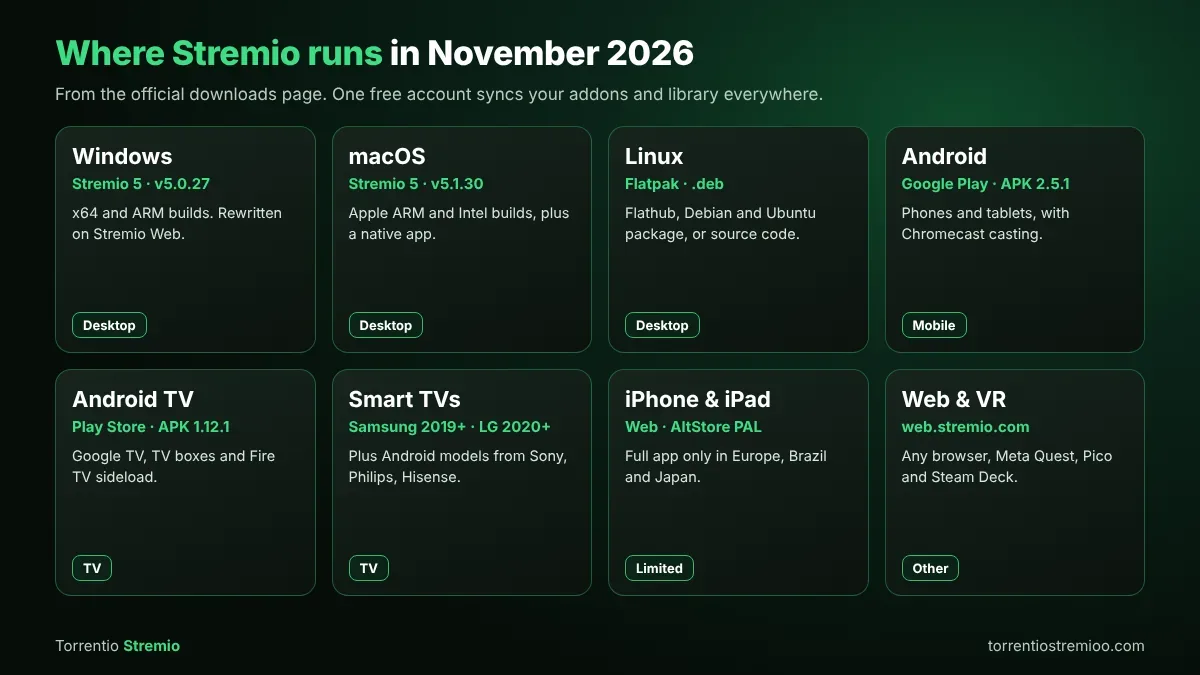
Stremio 5 for Windows is a complete rewrite of the interface based on Stremio Web, so the PC app and the browser version now look alike. Chromecast casting works from the desktop and Android apps.
For Android files and versions, see our Stremio APK guide. Amazon Fire TV users install the Android TV build, and our Firestick guide shows each step.
What is Stremio used for?
What is Stremio used for in everyday life? Most people use it as one home screen for everything they watch:
- One library for many sources: titles from all your addons appear together, with one search box.
- Following series: the Calendar shows new episodes of shows in your Library, and Continue Watching remembers where you stopped.
- Free legal viewing: YouTube channels, trailers and public domain films work right after you install.
- Your own files and links: Stremio plays local video files, normal web links, magnet links and torrent files you drag into the app.
- Big-screen viewing: it supports 4K HDR on capable devices and can cast to Chromecast.
- Subtitles in your language: see our Stremio subtitles guide.
Many users also pair Stremio with Torrentio and a debrid service for fast streams. For other torrent options, see our list of torrent addons for Stremio.
What Stremio is not
A good answer to "what is Stremio?" also covers what it is not. Clear up these points before you install it:
- Not a streaming service: there is no licensed library and no monthly fee for content.
- Not a content host: the official terms say the operator does not host, store or monitor content played through Stremio.
- Not a piracy app: Stremio is legal software. What you watch depends on your addons and your local law.
- Not a Kodi build: there are no repositories, skins or builds to install.
- Not a VPN: Stremio does not hide your IP address.
What is Stremio compared with Netflix?
If you asked what is Stremio after hearing it called "free Netflix", this table clears it up. The two work in completely different ways:
| Feature | Stremio | Netflix-style services |
|---|---|---|
| Price | Free app; optional Supporter plans | Monthly subscription |
| Own content | None; addons supply everything | Licensed library and own shows |
| Where video comes from | Addons you choose: web links, YouTube, torrents, debrid | The service's own servers |
| Legal status of content | Depends on your addons and local law | Licensed |
| Customization | Swap catalog, stream and subtitle addons | None |
| User profiles | Experimental Supporter perk | Included |
| Downloads for offline use | Experimental Supporter perk on desktop and Android | Usually in the mobile apps |
| Your own video files | Yes, through Local Files | No |
In short, Netflix sells you content, while Stremio gives you a player and leaves the sources to you. Many people keep their paid subscriptions and use Stremio next to them.
Stremio vs Kodi in brief
How does Stremio differ from Kodi, the other famous free media center? Kodi runs fully on your device, with local add-ons, skins and endless settings. Stremio is simpler: addons are web links, setup takes minutes, and your library syncs through the cloud. Our Stremio alternatives guide has a full Stremio vs Kodi table.
Pros and cons of Stremio
What is Stremio good at, and where does it fall short? Here is a balanced view.
Pros
- Free to use, with all current features included forever.
- Clean interface that looks the same on PC, web and TV.
- One account syncs addons, library and progress on every device.
- Addons install in one click and do not run code on your device.
- Open-source desktop app and a public addon SDK.
- Wide device support, from Windows to Samsung TVs and Meta Quest.
Cons
- Almost empty until you add stream addons.
- Streams depend on third-party addons, which can break or disappear.
- Full iPhone and iPad app only in some regions.
- Profiles, parental controls and downloads are paid experimental perks.
- Torrent streams share your IP address with other peers unless you use debrid or a VPN.
Is Stremio legal and safe?
Is Stremio legal? The app itself is legal software, available on Google Play and in TV app stores. Its terms say community addon developers are responsible for their addons' content and its legality. Streaming copyrighted content without permission can break the law where you live.
For safety, download Stremio only from stremio.com or official app stores, and install addons only from their official pages. Our Torrentio safety guide covers legality, privacy and VPN use in detail.
Who is Stremio for?
The app fits some people much better than others:
- Great for: people who want one tidy library across phone, PC and TV, series fans, and anyone already using Trakt or a debrid service.
- Good with some setup: TV and Firestick owners, who may need to sideload the app once.
- Not ideal for: people who want one paid service with zero setup, parents who need free parental controls, and iPhone users outside Europe, Brazil and Japan.
Is Stremio worth it in 2026?
For most people, yes. It costs nothing, takes about ten minutes to set up, and turns every device you own into the same familiar screen. The 2026 Supporter plans did not take any feature away from free users.
If you only watch one or two paid services and never want to manage addons, their own apps will feel simpler. Everyone else should try it, because it is free and easy to remove.
Getting started with Stremio in five steps
Now that "what is Stremio?" is answered, getting started takes minutes. Our beginner's guide on how to use Stremio walks through every menu.
- Download Stremio from the official downloads page or your device's app store.
- Create a free account, or choose guest mode if you do not need sync.
- Open Addons and look at the default addons already installed.
- Add the stream and subtitle addons you want, from their official pages.
- Search for a title, open it and pick a stream from the list.
Final words
So, what is Stremio? It is a free, partly open-source media center that turns addons into one clean library, with a streaming server for torrents, a free account for sync and apps for nearly every device. It hosts no content, so what you watch, and whether it is legal, depends on your addons. The optional Supporter plans only add extras, and the core app stays free.
Ready to add your first stream addon? Follow our Torrentio install guide, or explore our complete Torrentio Stremio guide for everything else.
Frequently Asked Questions
What is Stremio in simple words?
Stremio is a free app that works like a TV guide and a video player in one. It has no movies of its own. Instead, addons add catalogs, video links and subtitles, and Stremio shows everything in one library that syncs across your phone, computer and TV through a free account.
Is Stremio free, and what is Stremio Supporter?
Yes, Stremio is free on every device, and the team says current features will stay free forever. Stremio Supporter, launched in June 2026, is an optional plan at $39.99 per year or $199.99 once. It only adds experimental extras such as user profiles, a download manager and stream filters.
How does Stremio work?
When you open a title, Stremio asks every installed addon for matching streams and shows all the answers in one list. You pick a stream and the built-in player plays it. Torrent streams run through a small streaming server on your device, and subtitle addons add matching subtitles.
Who owns and develops Stremio?
Stremio's Google Play listing names Smart Code OOD, based in Sofia, Bulgaria, as the developer, and the official terms refer to the Stremio organization. The app was first released in 2015, its desktop version is open source, and the project is funded by its community and optional Supporter plans.
What is Stremio used for?
What is Stremio used for most? People use it as one home screen for movies, series, YouTube channels, public domain films and their own video files. It shows new episodes in a calendar, remembers where you stopped, supports Trakt, and lets you continue watching on another device.
Is Stremio legal to use?
Yes. Stremio itself is legal software, available in official app stores. It hosts no content, so legality depends on the addons you use and the law where you live. Official sources such as YouTube are fine, while streaming copyrighted content without permission can be illegal. Download Stremio only from stremio.com.