On this page
- 01What is the Stremio APK?
- 02Stremio APK latest version (November 2026)
- 03What you get with the Stremio APK
- 04Before you install: a quick checklist
- 05Google Play or Stremio APK: which should you use?
- 06Which Stremio APK file do you need?
- 07How to download and install the Stremio APK
- 08How to install the Stremio APK on Android TV and Google TV
- 09How the Stremio APK and Torrentio work together
- 10Stremio on different Android devices
- 11Tips for smooth playback on Android
- 12Is the Stremio APK safe?
- 13How to update the Stremio APK
- 14What to do after installing the Stremio APK
- 15Stremio APK not installing? Quick fixes
- 16Stremio APK on Chromebook and PC emulators
- 17Stremio APK or Stremio Web on Android?
- 18Common myths about the Stremio APK
- 19How to uninstall or reinstall the Stremio APK
- 20Is Stremio free on Android?
- 21Moving Stremio to a new phone
- 22Stremio on other devices
- 23Final words
- 24FAQs
Want the Stremio APK on your Android phone, tablet or TV box? You can get it two ways: from Google Play, or as an official APK file that you install yourself. This guide shows where to download the real Stremio APK, which of the four files fits your device, how to install and update it safely, and how to fix common install errors. We checked every version number below on Stremio's official downloads page on November 9, 2026.
Quick answer: the safest way to get Stremio on Android is Google Play (package com.stremio.one). If Play is not available, download the official Stremio APK from stremio.com/downloads. For most modern phones, pick the ARM64 file of version 2.5.1. For Android TV boxes, pick the Android TV build 1.12.1.
Official Stremio APK Downloads
What is the Stremio APK?
APK is the file format Android uses to install apps. The Stremio APK is simply the Stremio app packed as a file, so you can install it without opening Google Play. It is the same free media center you get from the store: you browse movies and series, install addons for streams and subtitles, and your library syncs with your Stremio account on every device.
The official Stremio APK comes straight from Stremio's own download server. The file name starts with the package name com.stremio.one, which is the same app ID used on Google Play. New to the app itself? Our guide on how to use Stremio explains every menu.
Stremio APK latest version (November 2026)
Stremio offers separate builds for phones and for Android TV. Here is what the official downloads page lists right now:
| Device | Latest Stremio APK | Older build offered | Files available |
|---|---|---|---|
| Android phones and tablets | 2.5.1 | 2.2.0-beta.5 | ARM, ARM64, x86, x86_64 |
| Android TV, Google TV, TV boxes | 1.12.1 | 1.10.0-rc.18 | ARM, ARM64, x86, x86_64 |
On Google Play the same app has 10M+ downloads, a 3.9-star rating from about 80,300 reviews and a 12+ age rating. Its listing was last updated on October 29, 2026. Stremio itself recommends using the latest version for the best performance, so only choose the older build if the new one gives you trouble.
What you get with the Stremio APK
The Stremio APK installs the full Android app, not a cut-down version. Once you sign in, you get:
- Board and Discover: browse popular movies, series and channels from your catalog addons.
- Library and Continue Watching: everything you save or start watching, synced with your other devices.
- Calendar: new episodes of the series in your library, shown by date.
- Addons: install stream, subtitle and catalog addons from a link or the built-in addon catalog.
- Casting: Stremio says its Android app can cast to Chromecast devices.
- External players: send any stream to VLC, MX Player or Just Player.
Because your addons live in your account, setting up Stremio on a new phone takes seconds: install the app, log in, and your addons and library appear.
Before you install: a quick checklist
- Free storage: keep at least a few hundred MB free. Stremio also uses space to cache video while you watch.
- A Stremio account: create one at stremio.com or inside the app, so your library syncs.
- Stable Wi-Fi: the download is quick, but streaming needs a steady connection.
- Your processor type: know whether your device is ARM64 or ARM, explained below.
- Remove old copies: if you have a Stremio APK from an unknown site, uninstall it first.
Google Play or Stremio APK: which should you use?
| Google Play | Stremio APK file | |
|---|---|---|
| Updates | Automatic | Manual, you install each new version |
| Setup | One tap | Allow "Install unknown apps" first |
| Works without Play Store | No | Yes, on any Android device |
| Older versions | Not available | Previous build offered on the downloads page |
| Best for | Most phones and Android TVs | Devices without Play, region limits, or rolling back |
Use Google Play when you can, because updates arrive on their own. Choose the Stremio APK when your device has no Play Store, when Play says the app is not available for your device, or when you need to go back to an older build.
Which Stremio APK file do you need?
Every Stremio APK release comes in four versions. They are the same app built for different processor types. Picking the wrong one is the most common reason for an "App not installed" error.
| File | Processor type | Typical devices |
|---|---|---|
| ARM64 (arm64-v8a) | 64-bit ARM | Almost every phone and tablet from the last several years, newer TV boxes |
| ARM (armeabi-v7a) | 32-bit ARM | Older and budget phones, many cheap TV sticks |
| x86_64 | 64-bit Intel or AMD | Android emulators on PC, some Chromebooks |
| x86 | 32-bit Intel or AMD | Old emulators and rare Intel tablets |
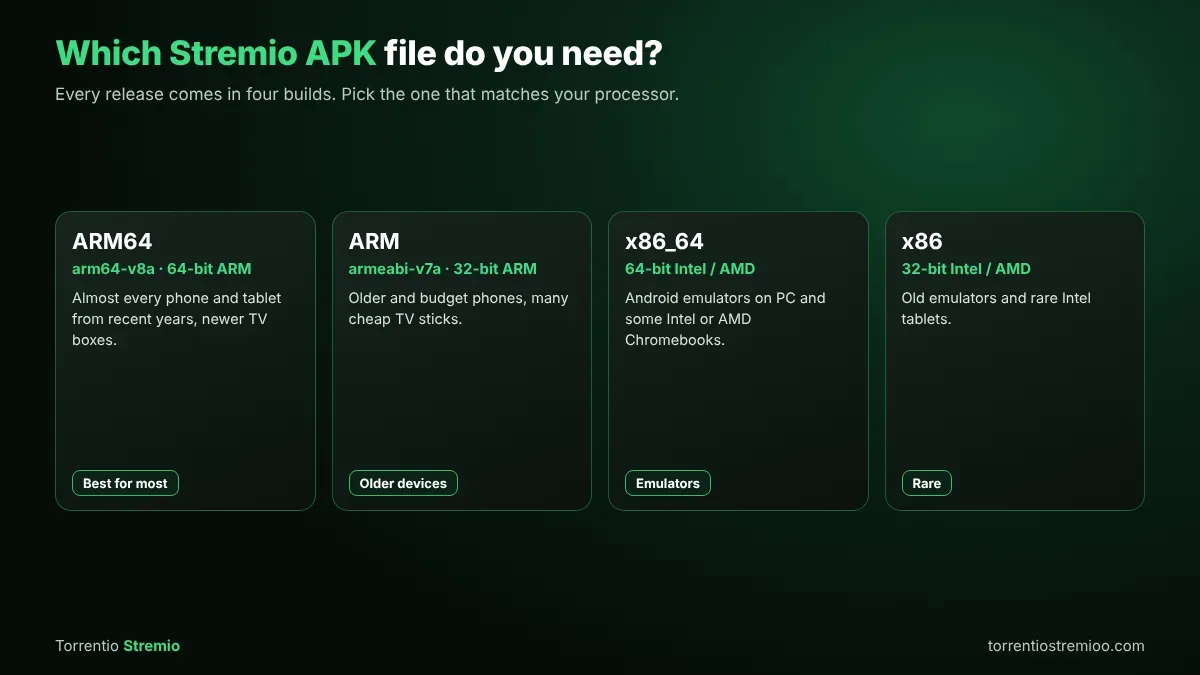
Not sure what your device uses? A free app such as CPU-Z or Droid Hardware Info shows the processor type. As a rule, pick ARM64 for any phone made in recent years. Some new phones no longer run 32-bit apps at all, so ARM64 is the safer choice there. If ARM64 refuses to install on an old phone or TV stick, use the ARM file.
How to download and install the Stremio APK
These steps work on Android 8 and newer, where the "Install unknown apps" permission is set for each app separately.
- On your phone, open your browser and go to stremio.com/downloads.
- Choose Mobile, then under Stremio for Android Mobile find Manual install.
- Tap the file that matches your device, for example Stremio 2.5.1 ARM64 APK. The file downloads from Stremio's own server, dl.strem.io.
- When the download finishes, tap Open.
- Android asks for permission. Tap Settings, turn on Allow from this source for your browser, then go back.
- Tap Install and wait a few seconds.
- Tap Open, then log in or create a free Stremio account.
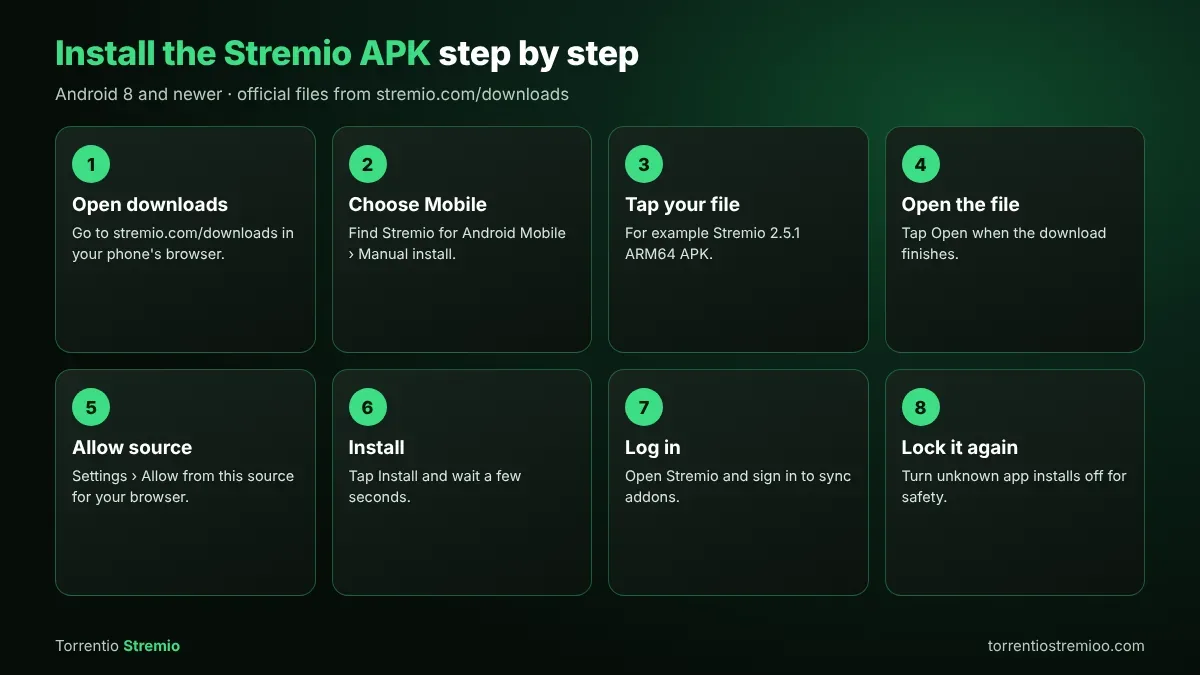
Note that Stremio's own help center article still describes the old global "Unknown sources" switch from early Android versions. On Android 8 and newer, the permission is set per app, exactly as in the steps above.
After installing, turn the "Install unknown apps" permission off again for your browser. You only need it during the install, and switching it off keeps your phone safer.
How to install the Stremio APK on Android TV and Google TV
On Android TV, Google TV, Nvidia Shield, Mi Box and similar boxes, first search for Stremio in the Play Store on the TV. If it is missing, install the Android TV build of the Stremio APK:
- Install the free Downloader app from the TV's Play Store.
- Allow Downloader to install unknown apps in the TV's security settings.
- Open Downloader and enter stremio.com/downloads.
- Under Stremio for Android TV, choose the 1.12.1 file that matches your box (ARM for most older boxes, ARM64 for newer ones).
- Install it and sign in with the same account you use on your phone.
Stremio also offers a small companion app called Stremio Launch on Boot that opens Stremio when your TV box starts. On a Fire TV Stick, follow our step-by-step Firestick guide instead, because Amazon devices have their own menus.
How the Stremio APK and Torrentio work together
Think of the app as a remote control and addons as the channels. The app shows posters, keeps your library and plays video. Addons do the searching. When you open a movie, Stremio asks every installed addon for links, and each one answers with the streams it knows about.
Torrentio is the most popular stream addon. It searches many public torrent sites at once and sorts results by quality, size and seeders. With a debrid service such as Real-Debrid or TorBox linked, Torrentio turns those torrents into fast direct links. Our Real-Debrid guide and TorBox guide show both setups, and our Torrentio addon link guide shows the official install address.
Stremio on different Android devices
| Device | Best way to install | File to choose if sideloading |
|---|---|---|
| Phone or tablet | Google Play | 2.5.1 ARM64 |
| Old or budget phone | Google Play | 2.5.1 ARM |
| Android TV or Google TV | Play Store on the TV | Android TV 1.12.1 |
| Fire TV Stick | Downloader app | See our Firestick guide |
| Chromebook | Google Play | x86_64 on Intel or AMD models |
Tips for smooth playback on Android
- Use 5 GHz Wi-Fi or a cable on TV boxes. It is faster and less crowded than 2.4 GHz.
- Pick 1080p on phones. A small screen gains little from 4K, and smaller files start faster.
- Keep storage free. Video is cached while you watch, and a full phone slows everything down.
- Close heavy apps running in the background, especially on TV sticks with little memory.
- Try an external player if a file stutters or shows a black screen.
These habits fix most playback problems before they start. For anything else, our troubleshooting guide covers every error message.
Is the Stremio APK safe?
The official Stremio APK is safe when you download it from stremio.com or Google Play. Problems start with copies from random sites, especially "mod" or "premium" versions. Stremio is already free, so any modded Stremio APK has nothing to unlock and may hide malware.
- Download only from stremio.com/downloads, which links to files on dl.strem.io, or from Google Play.
- Check that the package name is com.stremio.one.
- Keep Google Play Protect turned on.
- Never pay for a "Stremio Pro APK". The app is free, and its optional Supporter plan is offered only by Stremio itself.
The app is legal software, but what you stream depends on your addons. Read our Torrentio safety guide for privacy and VPN tips.
How to update the Stremio APK
Play Store installs update themselves. If you installed the Stremio APK manually, update it like this:
- Open stremio.com/downloads and check the latest version number.
- Download the same file type you used before, for example ARM64.
- Install it over the old app. Your settings stay, and your library and addons are saved in your account anyway.
If Android says the app cannot be updated, you probably installed the first copy from a different source. Uninstall it, then install the new Stremio APK and log in again.
What to do after installing the Stremio APK
A fresh install has a few default addons, such as Cinemeta for catalogs and OpenSubtitles v3 for subtitles, but most streams come from extra addons. Set up these four things in your first ten minutes:
- Stream addon: install Torrentio with our Torrentio install guide, then tune it with the Torrentio configure guide.
- More addons: browse our list of the best Stremio addons by category.
- Subtitles: set your language with our Stremio subtitles guide.
- Player: under Settings › Player › Advanced, Android lets you hand videos to VLC, MX Player or Just Player if the built-in player struggles.
Stremio APK not installing? Quick fixes
| Problem | Likely cause | Fix |
|---|---|---|
| "App not installed" | Wrong file for your processor | Try the ARM file instead of ARM64, or the other way round |
| "App not installed" when updating | Old copy came from another source | Uninstall the old app, then install the new APK |
| "There was a problem parsing the package" | Download broke halfway | Delete the file and download it again |
| Install button is grey | Unknown apps permission missing | Allow your browser or file manager to install unknown apps |
| Play Protect warning | Normal for apps installed outside Play | Continue only if the file came from stremio.com |
| Installs but nothing plays | Addon, network or player issue | Follow our Stremio not working guide |
Stremio APK on Chromebook and PC emulators
Most Chromebooks run Android apps from Google Play, so search for Stremio in the Play Store there first. If your Chromebook has an Intel or AMD chip and you must sideload, the x86_64 file is the one to try.
Some people run the Android app inside an emulator such as BlueStacks on Windows. It works, but there is no good reason to do it. Stremio has native apps for Windows, macOS and Linux that run faster and support every feature, so use those on a computer instead.
Stremio APK or Stremio Web on Android?
You can also open web.stremio.com in Chrome on Android. It is handy on a borrowed phone, but the Stremio APK is the better daily choice:
| Stremio APK | Stremio Web in a browser | |
|---|---|---|
| Torrent streams | Played by the app itself | Need a streaming server running on a device |
| External players | VLC, MX Player, Just Player | Limited |
| Casting | Chromecast support | Depends on the browser |
| Install needed | Yes | No |
Common myths about the Stremio APK
- "The APK includes movies." It does not. Stremio is an empty media center until you add addons.
- "You need root." No. The app installs on any normal Android device.
- "A premium APK unlocks more." No. The official app is free, and modded copies only add risk.
- "APK installs never update." They do not update on their own, but you can install a newer version over the old one in a minute.
How to uninstall or reinstall the Stremio APK
To remove Stremio, long-press its icon and choose Uninstall, or open Settings › Apps › Stremio › Uninstall. Reinstalling is just as easy: install the app again and log in. Your addons and library come back from your account, so you lose nothing except local app settings.
Is Stremio free on Android?
Yes. The app on Google Play and the official APK on stremio.com are both free, with no trial and no paywall for watching. Stremio is funded by its community and offers an optional Supporter plan that unlocks experimental features, but you never need it to stream. Some addons and services you connect, such as debrid accounts, have their own prices. Those are separate from the app.
Moving Stremio to a new phone
Switching phones is painless because Stremio keeps your setup in the cloud:
- Install the app on the new phone from Google Play or stremio.com.
- Log in with the same email or account you used before.
- Wait a few seconds for your addons, library and watch progress to sync.
- Check Settings › Player for your subtitle language and external player choice, because some settings can be saved per device.
If you used Stremio without an account, there is nothing to sync. Create an account on the old phone first, then log in on the new one.
Stremio on other devices
APK files are only for Android. The official downloads page also lists apps for Windows (Stremio 5, version 5.0.27), macOS (Stremio 5, version 5.1.30), Linux through Flathub, Samsung TVs from 2019 and LG TVs from 2020 through their app stores, and a web version at web.stremio.com. On iPhone and iPad, Stremio offers a limited web version, and a full version through AltStore PAL in Europe, Brazil and Japan. If you are thinking about other apps entirely, see our list of Stremio alternatives.
Final words
Getting the Stremio APK right takes two minutes. Use Google Play when you can. When you cannot, download the official Stremio APK from stremio.com, pick ARM64 for modern phones or the Android TV build for TV boxes, and switch off unknown app installs afterwards. Then add Torrentio and a subtitle addon, and your Android device is ready to stream.
Next step: follow our Torrentio install guide or explore the complete Torrentio Stremio guide.
Frequently Asked Questions
Is the Stremio APK free?
Yes. The official Stremio APK and the Google Play app are both free, with no paywall for watching. Stremio offers an optional Supporter plan, but you never need it to stream.
Is the Stremio APK safe to install?
Yes, when you download it from stremio.com/downloads or Google Play. Avoid modded or "premium" copies from other sites, check that the package name is com.stremio.one, and keep Google Play Protect on.
Which Stremio APK should I download?
Pick the ARM64 (arm64-v8a) file for almost any modern phone or tablet, the ARM (armeabi-v7a) file for older devices, and the Android TV build for TV boxes and Google TV.
What is the latest Stremio APK version?
In November 2026 the official downloads page lists Stremio 2.5.1 for Android phones and tablets and Stremio 1.12.1 for Android TV, each in ARM, ARM64, x86 and x86_64 builds.
Can I install the Stremio APK on a Firestick?
Yes. Install the Downloader app on your Fire TV, open stremio.com/downloads, choose the Android TV build and install it. Our Firestick guide shows each step.
Why does Android say "App not installed"?
Usually you picked the wrong file for your processor or an older copy from another source is still installed. Try the other ARM build, or uninstall the old app first and install the new Stremio APK again.