On this page
- 01Best Stremio alternatives at a glance
- 02What makes a good Stremio alternative?
- 031. Nuvio — the closest Stremio alternative
- 042. Kodi — the most powerful Stremio alternative
- 053. CloudStream — extension-based app for Android
- 064. Syncler — debrid and Trakt powerhouse
- 075. Plex — your own media plus free TV
- 086. Jellyfin — free, private and open source
- 097. Emby — home server with premium extras
- 108. Infuse — the best Stremio alternative for Apple devices
- 11Stremio vs Kodi: which should you use?
- 12Which Stremio alternative should you choose?
- 13Best Stremio alternative for each device
- 14Free vs paid Stremio alternatives
- 15How to switch from Stremio without losing your watchlist
- 16Mistakes to avoid when trying a new app
- 17Should you leave Stremio at all?
- 18Are Stremio alternatives legal and safe?
- 19Stremio still has a few strengths that alternatives lack
- 20Final words
- 21FAQs
Looking for a Stremio alternative? Maybe Stremio does not run well on your TV, maybe you want more control over your library, or maybe you just want to see what else is out there. This guide compares the 8 best apps like Stremio in 2026, free and paid, with their platforms, prices and the one thing each does better than Stremio. We checked every app's official page and pricing on November 5, 2026, so you can choose without guesswork.
Quick answer: the closest Stremio alternative is Nuvio, a free open-source app that can use Stremio-style addons. Pick Kodi for maximum control, Syncler for debrid and Trakt on Android TV, and Plex or Jellyfin if you want to stream your own files. On iPhone and Apple TV, Infuse is the most polished player.
Best Stremio alternatives at a glance
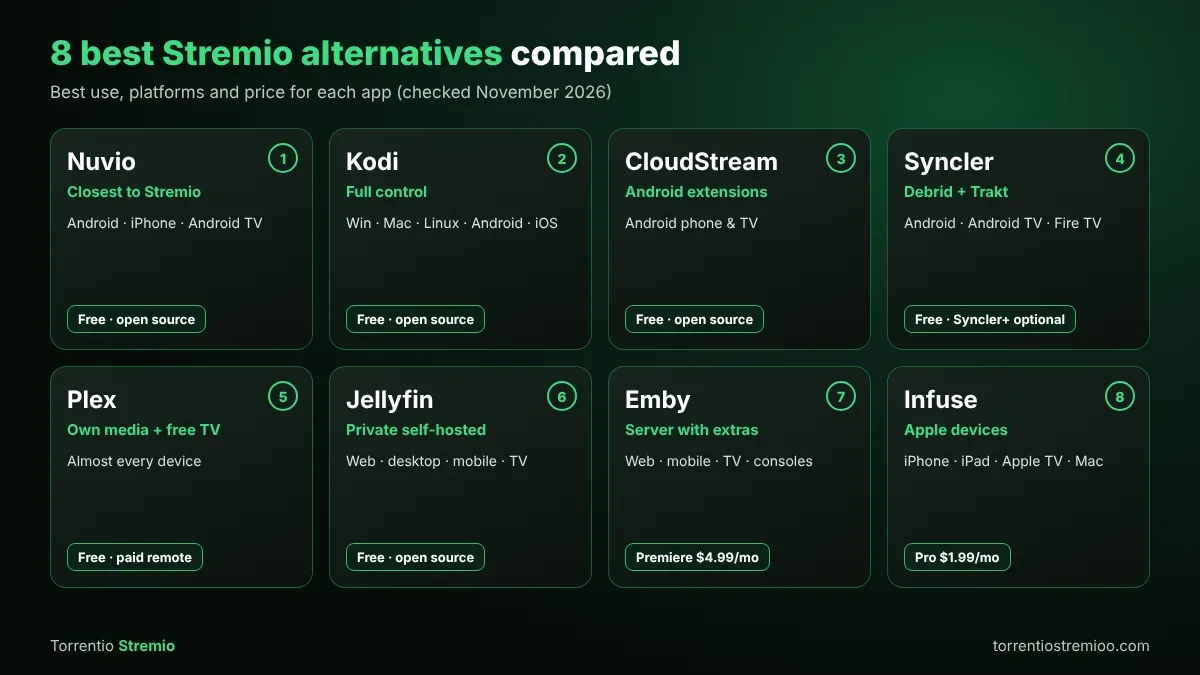
Here is how every Stremio alternative in this guide compares. Prices are from each official page on the day we checked.
| App | Best for | Platforms | Price |
|---|---|---|---|
| Nuvio | Closest to Stremio | Android, iPhone, Android TV | Free, open source |
| Kodi | Full control and custom builds | Windows, Mac, Linux, Android, iOS | Free, open source |
| CloudStream | Extensions on Android | Android phone and TV | Free, open source |
| Syncler | Debrid and Trakt on TV | Android, Android TV, Fire TV | Free, optional Syncler+ |
| Plex | Your own media plus free TV | Almost every device | Free, paid remote playback |
| Jellyfin | Private, self-hosted server | Web, desktop, mobile, TV, Roku | Free, open source |
| Emby | Home server with extras | Web, mobile, TV, consoles | Free core, Premiere from $4.99/month |
| Infuse | Best player on Apple devices | iPhone, iPad, Apple TV, Mac, Vision | Free, Pro from $1.99/month |
What makes a good Stremio alternative?
Stremio is a free media center that gets its content from addons, syncs your library across devices and runs on Windows, Mac, Linux, Android, Android TV, LG TVs and the web. A real Stremio alternative should match most of that. We judged each app on five points:
- Content model: does it work with addons, extensions or your own files?
- Devices: does it run on TV, phone and computer?
- Debrid and Trakt support: important if you use Real-Debrid or TorBox with Stremio today.
- Ease of setup: how long until you press play the first time?
- Cost: is it free, and what do paid features add?
Note that none of these apps ship with movies or shows built in, just like Stremio. What you watch depends on the sources you add, so stay with legal sources in your country.
1. Nuvio — the closest Stremio alternative
Nuvio is the Stremio alternative most people mean when they ask for "Stremio, but different". It is a free, open-source app under the GPL-3.0 license, built by the developer tapframe. It runs on Android, iPhone and Android TV, and it can work with the Stremio addon ecosystem through addons and extensions you install yourself. The official Nuvio Android TV repository on GitHub has more than 3,300 stars, and the TV app is offered on Google Play and as an APK.
- Pros: familiar to Stremio users, modern TV interface, free and open source.
- Cons: younger project, so not every Stremio addon behaves exactly the same.
- Best for: people who like Stremio's addon idea but want a different app.
2. Kodi — the most powerful Stremio alternative
Kodi is the classic open-source media center and the oldest Stremio alternative on this list. The current stable release on the official site is Kodi v21.3 "Omega", with native apps for Windows, Mac, Linux, Android and iOS. Kodi ships with no content. You add your own files or install add-ons from repositories, and you can change almost everything, from skins to remote control buttons.
- Pros: huge add-on library, plays local files very well, endless customization.
- Cons: steeper learning curve, no built-in cloud sync between devices, and third-party repositories vary in quality.
- Best for: users who enjoy tweaking and want one app for local files and online sources.
If you are torn between the two, see our full Stremio vs Kodi comparison further down.
3. CloudStream — extension-based app for Android
CloudStream is a free Android app for phones and TVs, released under GPL-3.0. By default it has no video sources. Everything comes from extensions, and its own docs list examples such as YouTube, Twitch, LibriVox and the iptv-org channel lists. Its GitHub repository has around 11,000 stars, which shows a large and active community.
- Pros: open source, light, many extensions, tracking support.
- Cons: Android only, and its extension format is different from Stremio addons.
- Best for: Android users who want a Stremio alternative with a plugin system.
4. Syncler — debrid and Trakt powerhouse
Syncler is an Android app for phones, tablets and TV devices such as Fire TV and Nvidia Shield. It needs Android 5.0 or later. Like Stremio, it does not provide streams itself. You install provider packages, then link debrid services. Its official site lists Real-Debrid, Premiumize, AllDebrid and TorBox, plus Trakt, Simkl and MyAnimeList for tracking. It also hands videos to external players such as Just Player, MX Player, VLC and Kodi.
- Pros: excellent for debrid users, strong watchlist sync, can use several debrid accounts at once.
- Cons: no iPhone or desktop app, and some features sit behind the paid Syncler+ plan.
- Best for: Android TV and Firestick owners who already pay for Real-Debrid or TorBox.
Already using debrid with Stremio? Our Torrentio Real-Debrid guide and TorBox guide show how to get the same benefit without switching apps.
5. Plex — your own media plus free TV
Plex turns your computer or NAS into a personal Netflix for the movies and shows you own. Setting up a Plex server and streaming on your home network is free. Plex also offers free, ad-supported movies and live TV channels. To stream your own media away from home, you need a Plex Pass or a Remote Watch Pass. According to Plex's FAQ, the Remote Watch Pass is $2.99 per month or $29.99 per year for billing cycles from June 1, 2026.
- Pros: beautiful interface, apps on almost every TV and console, easy sharing with family.
- Cons: you need your own files for the main features, and remote viewing now costs money.
- Best for: people with a movie collection who want it on every screen.
6. Jellyfin — free, private and open source
Jellyfin does what Plex does, but it is completely free and open source under the GPL. There are no paid tiers and no account with a company. You run the server yourself and stream movies, shows, music, live TV, books and photos to your devices. According to the official Jellyfin website, clients exist for web, desktop, Android and Android TV, iPhone and Apple TV, Fire TV, Roku and even Kodi.
- Pros: 100% free, private, no tracking, active volunteer community.
- Cons: you maintain the server, and setup takes longer than Stremio.
- Best for: privacy-minded users with their own media library.
7. Emby — home server with premium extras
Emby sits between Plex and Jellyfin. You run your own server, and the optional Emby Premiere plan unlocks extras such as offline downloads, DVR, hardware-accelerated transcoding and full mobile apps. Premiere costs $4.99 per month, $54 per year or $119 for a lifetime license, covering one household and up to 30 devices. Like the others, Emby provides no content of its own.
- Pros: polished apps, live TV and DVR, apps on Xbox and PlayStation.
- Cons: many useful features are paid, and you need your own server.
- Best for: households that want Plex-style features with more control.
8. Infuse — the best Stremio alternative for Apple devices
Stremio on iPhone and iPad is limited, so Apple users often look for a Stremio alternative first. Infuse by Firecore is a video player for iPhone, iPad, Apple TV, Mac and Apple Vision. It plays almost every format, including MKV, HEVC and AV1, and it connects to Plex, Emby, Jellyfin, network shares (SMB, NFS, WebDAV) and cloud drives. The free version covers most features. Infuse Pro adds Dolby Vision, Dolby Atmos, more formats and AirPlay for $1.99 per month, $16.99 per year or $99.99 lifetime.
- Pros: best playback quality on Apple TV, clean design, Trakt sync.
- Cons: Apple only, and it needs a source such as Plex, Jellyfin or a file share.
- Best for: Apple TV owners who want perfect playback of their own files.
Infuse also works as an external player for Stremio on iPhone. Our Stremio not working guide shows how to switch players when playback fails.
Stremio vs Kodi: which should you use?
Stremio and Kodi are the two names people compare most. Both are free and both use add-ons, but they feel very different.
| Feature | Stremio | Kodi |
|---|---|---|
| Setup time | Minutes: install, log in, add addons | Longer: add-ons, repositories, settings |
| How add-ons work | Addons are web services you install from a link | Add-ons are installed from repositories onto your device |
| Sync across devices | Built in with a free account | Not built in; needs extra add-ons such as Trakt |
| Local files | Basic, through the Local Files addon | Excellent, with full library scraping |
| Customization | Limited | Almost unlimited skins and settings |
| Best for | Quick, simple streaming on every device | Power users and home theater setups |
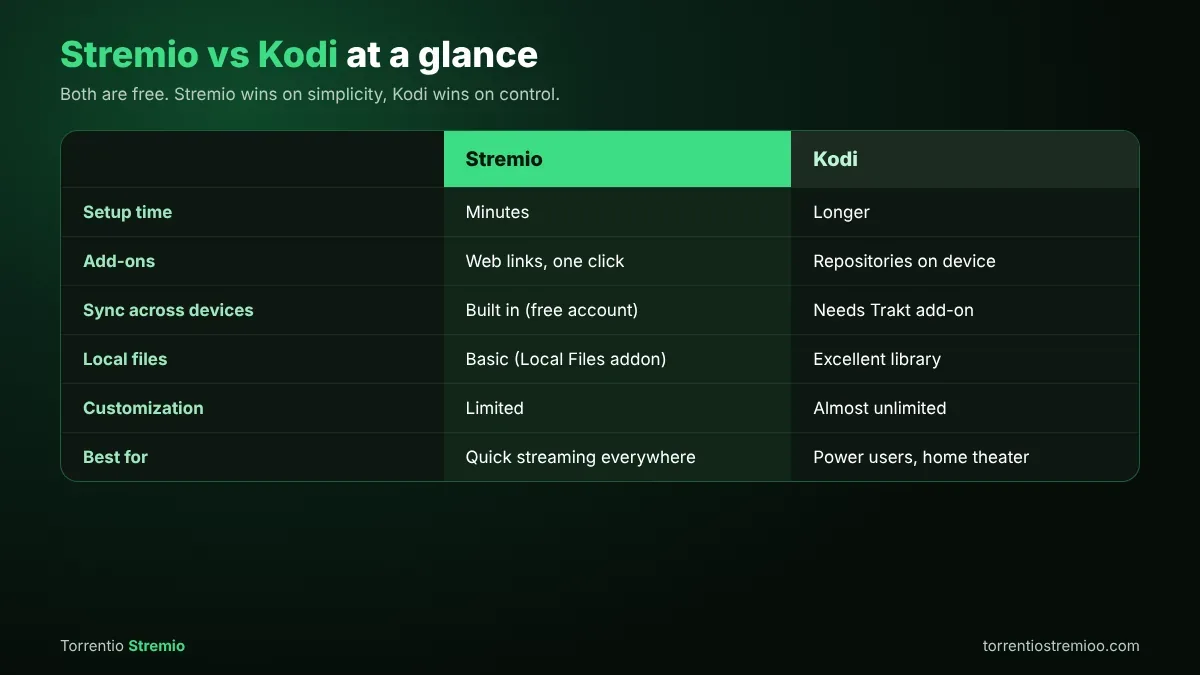
Our verdict: if you want to press play within five minutes and keep your library in sync on phone and TV, stay with Stremio. If you love to customize and keep a large local collection, Kodi is the stronger Stremio alternative.
Which Stremio alternative should you choose?
- You want the same experience in a different app: Nuvio.
- You want total control: Kodi.
- You use Android and like plugins: CloudStream.
- You pay for debrid and use Trakt: Syncler.
- You own movies and want them everywhere: Plex, Jellyfin or Emby.
- You use an iPhone or Apple TV: Infuse.
Many people end up using two apps: Stremio for quick streaming and a media server such as Jellyfin for their own files.
Best Stremio alternative for each device
Your device often decides the winner. Some apps shine on a TV remote, others only exist for Apple or Android. Use this table to pick a Stremio alternative that actually runs where you watch.
| Device | Top pick | Runner-up |
|---|---|---|
| Android TV and Google TV | Nuvio | Syncler |
| Fire TV Stick | Syncler | Kodi |
| Android phone | CloudStream | Nuvio |
| iPhone and iPad | Infuse | Nuvio |
| Apple TV | Infuse | Plex |
| Windows, Mac and Linux | Kodi | Jellyfin |
| Smart TVs (Samsung, LG, Roku) | Plex | Jellyfin |
Fire TV owners should also read our Torrentio Firestick guide, because Stremio itself runs very well on a Firestick once it is set up right.
Free vs paid Stremio alternatives
Stremio is free, so it is fair to ask what you get by paying for something else. Five apps here are completely free: Nuvio, Kodi, CloudStream and Jellyfin cost nothing at all, and Syncler has a free version. The paid options charge for convenience, not for content:
- Plex: streaming at home is free; remote playback of your own media needs Plex Pass or a Remote Watch Pass.
- Emby Premiere: $4.99 per month, $54 per year or $119 lifetime for offline downloads, DVR and more.
- Infuse Pro: $1.99 per month, $16.99 per year or $99.99 lifetime for Dolby Vision, Atmos and extra formats.
- Syncler+: an optional upgrade for extra syncing features.
Our advice: start with a free Stremio alternative. Pay only when a specific feature, such as Dolby Vision on Apple TV, solves a real problem for you.
How to switch from Stremio without losing your watchlist
The easiest way to take your history to a new app is Trakt. Stremio can send what you watch to a free Trakt account, and most apps on this list can read Trakt too.
- In Stremio, open Settings and find Trakt Scrobbling, then press Authenticate and sign in to Trakt.
- Keep watching for a few days, or add your favorite titles to your Trakt watchlist.
- Install your new app and connect the same Trakt account. Syncler, Kodi (with a Trakt add-on), Infuse and many others support it.
- Your watchlist and progress show up in the new app, and you can still open Stremio whenever you like.
This way, trying a Stremio alternative is risk free. You never lose the list you built.
Mistakes to avoid when trying a new app
- Installing modified APKs: download each app only from its official site, GitHub page or app store.
- Adding too many sources: five or six good sources beat fifty broken ones, in any app.
- Forgetting your debrid key: if you move your debrid account to a new app, keep the key private and never paste it into unknown websites.
- Judging too fast: give each app a few days. Kodi and Jellyfin need setup time before they show their strengths.
Should you leave Stremio at all?
Before you switch, ask why you want a Stremio alternative. Most reasons have a fix inside Stremio:
- "Nothing plays" or "No streams were found": usually an addon or network issue. Our Stremio not working guide walks through 17 fixes.
- "Not enough links": add a better stream addon. See our best torrent addons for Stremio.
- "Hard to use": our beginner guide on how to use Stremio explains every menu.
- "Missing features": many come from addons. Browse our list of the best Stremio addons.
If you are looking for a replacement for one addon rather than the whole app, you do not need a Stremio alternative at all. You need a Torrentio alternative, and our Torrentio vs Comet comparison is a good place to start.
Are Stremio alternatives legal and safe?
Every app in this guide is legal software. Kodi, Jellyfin, CloudStream and Nuvio are open source, and Plex, Emby, Infuse and Syncler are offered by established developers through their official sites and app stores. What matters is the content you play. Kodi's own download page says it contains no content and that Team Kodi does not approve of pirated content. The same rule applies to every Stremio alternative here.
For safety, download apps only from official stores and project pages, avoid modified APKs, and protect your privacy online. Our Torrentio safety guide explains VPNs and safe habits in plain language.
Stremio still has a few strengths that alternatives lack
After comparing all eight, Stremio keeps some clear advantages. It is free, it syncs your library and addons with one login, it runs in a browser with no install, and its addon system takes seconds to set up. Optional Supporter plans unlock experimental features, but the core app costs nothing. If one of those matters most to you, Stremio may still be the best choice.
Get Stremio from the Official Site
Final words
The best Stremio alternative depends on what you need. Nuvio is the closest match, Kodi gives the most control, Syncler is ideal for debrid users on Android TV, Plex, Jellyfin and Emby are made for your own media, and Infuse is the top pick on Apple devices. Try one or two of them next to Stremio for a week, and keep the one that fits how you watch.
Staying with Stremio? Set it up properly with our Torrentio install guide or explore the complete Torrentio Stremio guide.
Frequently Asked Questions
What is the best Stremio alternative?
Nuvio is the closest Stremio alternative because it is free, open source and can work with Stremio-style addons. Kodi is the best choice if you want full control, and Syncler is best for debrid users on Android TV.
Is there a free Stremio alternative?
Yes. Nuvio, Kodi, CloudStream and Jellyfin are completely free, and Syncler and Plex have free versions. Paid plans such as Plex Pass, Emby Premiere and Infuse Pro only add extra features.
Is Kodi better than Stremio?
Kodi is better for customization and local media libraries. Stremio is better if you want simple setup and built-in sync across devices. Many people use Stremio for quick streaming and Kodi for their own files.
What is the best Stremio alternative for iPhone and Apple TV?
Infuse is the best pick on Apple devices. It plays almost every format and connects to Plex, Emby, Jellyfin and network shares. The free version covers most features, and Infuse Pro starts at $1.99 per month.
Can I use Stremio addons in other apps?
Some apps can. Nuvio supports Stremio-style addons through addons and extensions you install yourself, but not every addon behaves exactly the same as it does in Stremio.
Are Stremio alternatives legal?
The apps themselves are legal software, and none of them include movies or shows. Whether your use is legal depends on the sources you add, so stick to content you have the right to watch.