On this page
- 01What is Stremio for PC?
- 02Stremio for PC: latest versions (November 2026)
- 03Which Stremio for PC file should you download?
- 04Stremio for PC system requirements
- 05How to install Stremio for PC on Windows
- 06How to install Stremio for PC on a Mac
- 07How to install Stremio for PC on Linux
- 08Stremio 5 vs Stremio 4.4: what changed?
- 09First-run setup: log in and add Torrentio
- 10Desktop-only features of Stremio for PC
- 11Stremio for PC keyboard shortcuts
- 12Stremio for PC vs Stremio Web vs an Android emulator
- 13How to update Stremio for PC
- 14How to uninstall Stremio for PC
- 15Is Stremio for PC safe and legal?
- 16Stremio for PC not working? Quick fixes
- 17Final words
- 18FAQs
Looking for Stremio for PC? The free desktop app runs on Windows, macOS and Linux, and it is the most complete version of Stremio you can install. This guide shows which file to download for your computer, how to install it step by step on each system, what changed in Stremio 5, and how to set it up with Torrentio in a few minutes. We checked every version number below on Stremio's official downloads page and blog on November 9, 2026.
Quick answer: download Stremio for PC only from stremio.com/downloads. On Windows, pick Stremio 5 x64 (version 5.0.27) for most computers, or Stremio 5 ARM for laptops with an ARM chip. On a Mac, pick Stremio 5 ARM (version 5.1.30) for Apple Silicon or Stremio 5 Intel for older Macs. On Linux and Steam Deck, install the Flatpak from Flathub.
Official Stremio for PC Downloads
What is Stremio for PC?
Stremio for PC is the desktop version of Stremio, a free media center for movies, series, live TV and YouTube channels. It does not host any content itself. You install addons, and those addons supply catalogs, streams and subtitles. What you can watch depends on the addons you choose and the laws where you live.
Stremio for PC has one big advantage over the web version: it includes the streaming server, the small helper that plays torrent streams and caches video. It also plays magnet links, HTTP links and torrent files that you drop into the window, and it can cast to a Chromecast.
Your addons and library sync through your free Stremio account, so the same setup appears on your phone and TV. New to the menus? Our guide on how to use Stremio explains every screen.
Stremio for PC: latest versions (November 2026)
Stremio for PC comes in different builds for each desktop system. Here is what the official downloads page lists right now:
| System | Current build | File type | Older builds offered |
|---|---|---|---|
| Windows | Stremio 5 x64 and Stremio 5 ARM, version 5.0.27 | .exe installer | Stremio 4.4 |
| macOS | Stremio 5 ARM and Stremio 5 Intel, version 5.1.30 | .dmg | Stremio 4.4 (High Sierra and up), 4.4.106 (El Capitan to Sierra) |
| macOS, Native version | Stremio 2.1.1 for ARM and Intel | .zip | None listed |
| Linux (64-bit) | Flatpak on Flathub, now Stremio v5 | Flatpak | Stremio 4.4.168 .deb, source code on GitHub |
| Steam Deck | Flatpak on Flathub | Flatpak | None listed |
Stremio 5 reached each system at a different time. Windows got it first in December 2024, macOS followed in November 2025, and Linux users received it when Stremio moved v5 to the stable Flatpak channel on June 26, 2026. Stremio 4.4 is still offered as a fallback, but the recent desktop updates on Stremio's blog are all for Stremio 5 and the Mac Native version.
Which Stremio for PC file should you download?
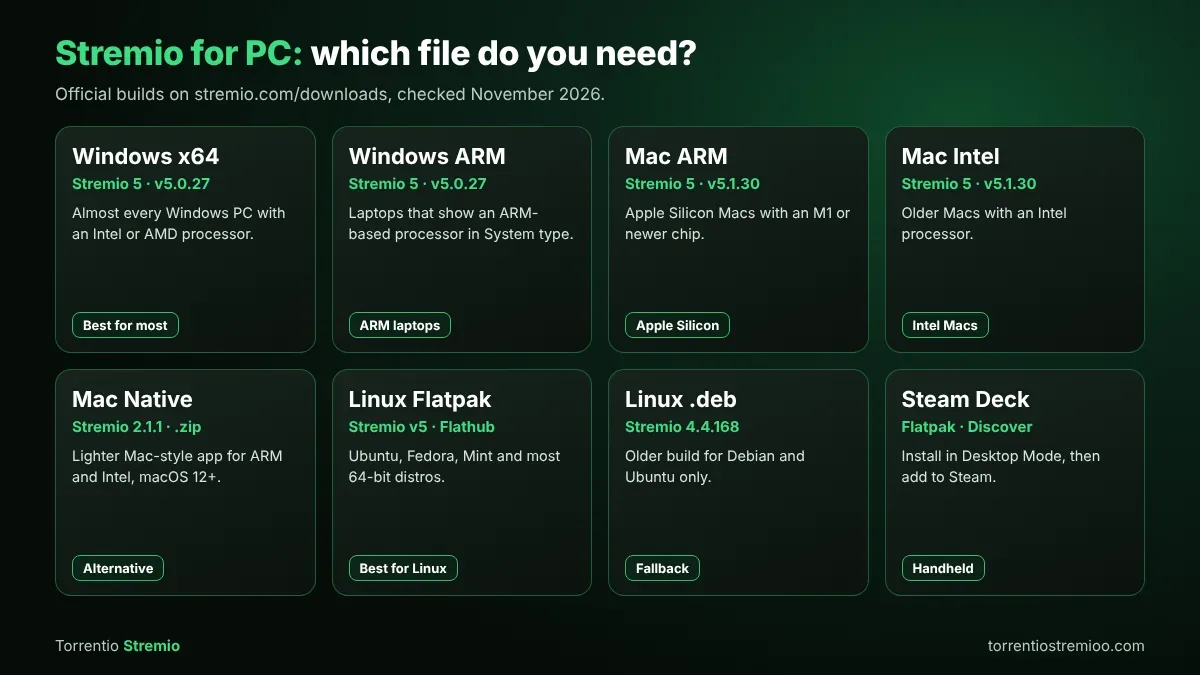
Picking the right file is the most important step. The wrong one may refuse to install, or it may run slower through emulation. Use this table to find yours:
| Your computer | How to recognise it | File to pick |
|---|---|---|
| Most Windows desktops and laptops | Intel or AMD processor | Stremio 5 x64 |
| Windows laptop with an ARM chip | "ARM-based processor" under System type | Stremio 5 ARM |
| Mac with Apple Silicon | "Chip: Apple M..." in About This Mac | Stremio 5 ARM |
| Mac with an Intel processor | "Processor: Intel..." in About This Mac | Stremio 5 Intel |
| Mac on macOS 12 or newer | You want a lighter, Mac-style app | Native version 2.1.1 |
| Old Mac on El Capitan or Sierra | macOS 10.11 or 10.12 | Stremio 4.4.106 |
| Ubuntu, Fedora, Mint and most distros | 64-bit Linux | Flatpak |
| Steam Deck | SteamOS | Flatpak |
Stremio Windows: x64 or ARM?
Open Settings › System › About and look at System type. If it says "x64-based processor", download Stremio 5 x64. If it says "ARM-based processor", choose Stremio 5 ARM, which the downloads page lists "for ARM processors".
Stremio Mac: Apple Silicon or Intel?
Click the Apple menu and choose About This Mac. A line called Chip with an Apple M-series name means Apple Silicon, so take Stremio 5 ARM. A line called Processor with an Intel name means you need Stremio 5 Intel, which Stremio describes as the build for "older Intel processors".
Stremio Linux: Flatpak or .deb?
Choose the Flatpak. It carries Stremio v5, works on almost every distribution and updates with the rest of your apps. The .deb package is still the older Stremio 4.4.168, so use it only if Flatpak is not an option on your Debian or Ubuntu system.
Stremio for PC system requirements
Stremio does not publish minimum hardware specs for its desktop apps. Here is what the official pages do tell you:
- Windows: a 64-bit PC with an x64 or ARM processor, because those are the only two builds. The Stremio 5 shell uses Microsoft WebView2, which comes with Windows 10 and 11.
- Mac: the Native version 2.1 needs macOS 12 or newer, according to Stremio's blog. For older Macs, Stremio 4.4 supports High Sierra and up, and 4.4.106 covers El Capitan to Sierra.
- Linux: a 64-bit system. Flathub offers builds for x86_64 and aarch64, and the download is about 50 MiB.
- Disk space: room for the video cache. Under Settings › Streaming you can pick no caching, 2 GiB, 5 GiB, 10 GiB or Infinite.
As a rule of thumb, a computer that plays HD video smoothly in a browser will run Stremio for PC well. Smooth 4K HDR playback needs a newer graphics chip and a fast internet connection.
How to install Stremio for PC on Windows
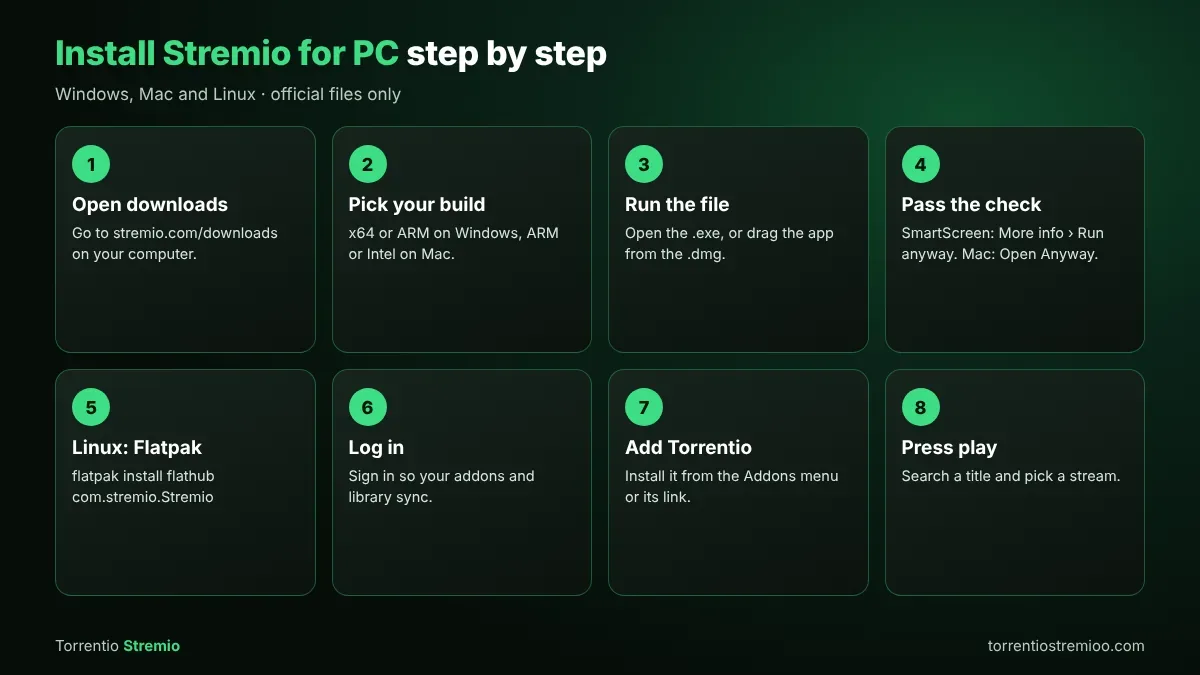
These steps install Stremio for PC on Windows 10 and Windows 11:
- Open stremio.com/downloads in your browser and find Stremio for Windows.
- Click Stremio 5 x64, or Stremio 5 ARM on an ARM laptop. The installer downloads from Stremio's own server, dl.strem.io.
- Open the downloaded file. Its name looks like StremioSetup-v5.0.27_x64.exe.
- If a blue box says Windows protected your PC, click More info, then Run anyway.
- Click Yes if Windows asks to allow the app to make changes, then follow the setup screens.
- When setup finishes, Stremio opens. Log in or create a free account.
Why the warning? When Stremio 5 for Windows launched, the team added a new code signing certificate and said it may trigger the "Windows protected your PC" alert at first. Microsoft SmartScreen shows this for programs it has not seen often yet. It does not mean the file is infected, but only click Run anyway for a file you downloaded from stremio.com.
How to install Stremio for PC on a Mac
- Open stremio.com/downloads and scroll to Stremio for macOS.
- Click Stremio 5 ARM for Apple Silicon or Stremio 5 Intel for an Intel Mac. You get a .dmg file.
- Open the .dmg and drag Stremio into your Applications folder.
- Open Stremio from Applications or Launchpad.
- If macOS blocks it, open System Settings › Privacy & Security, scroll to Security, click Open Anyway and enter your password.
- Log in to your Stremio account.
Apple says the Open Anyway button stays available for about an hour after you try to open the app. On macOS Sequoia and newer, the old right-click and Open trick no longer skips this check, so use System Settings as shown. Apple's Mac User Guide walks through the same steps.
Stremio 5 or the Native version on Mac?
Stremio Mac users get a second choice called the Native version (Stremio 2.1.1, a .zip for ARM and Intel). It is a separate app that shares its technology with Stremio for iPhone, iPad and Apple TV, while Stremio 5 belongs to the desktop family. Stremio's blog says the Native version is notarized, supports torrent streaming, updates itself and can use the system Picture in Picture window. Version 2.1 needs macOS 12 or newer.
Pick Stremio 5 if you want the same interface and features as on Windows and Linux. Try the Native version if you prefer a Mac-style app with native menus. Both use the same account, so switching later costs you nothing.
How to install Stremio for PC on Linux
The easiest way to get Stremio for PC on Linux is the Flatpak from Flathub. On distributions with Flathub already enabled, such as Linux Mint, you can open the software center, search for Stremio and click Install. From a terminal, follow these steps:
- Make sure Flatpak and the Flathub repository are set up. Most popular distributions include them or explain it in their docs.
- Install Stremio:
flatpak install flathub com.stremio.Stremio - Start it from your app menu, or run
flatpak run com.stremio.Stremio - Log in to your Stremio account.
Stremio's blog notes that v5 spent a long time in the Flatpak beta channel before it reached stable, and that some bugs may still be unknown. If v5 misbehaves on your system, the official Linux v5 announcement includes a command to roll back to v4.
Prefer a .deb file? Download Stremio 4.4 Debian/Ubuntu, open a terminal in the folder where it was saved and run sudo apt install ./stremio_4.4.168-1_amd64.deb. If the old version will not start, Stremio's help center suggests running sudo apt-get install -f to add missing dependencies.
Stremio on Steam Deck
Steam Deck uses the same Flatpak. Hold the power button, choose Switch to Desktop, open the Discover store, search for Stremio and install it. To start it from Gaming Mode, open Steam in Desktop Mode, choose Add a Non-Steam Game and pick Stremio from the list.
Stremio 5 vs Stremio 4.4: what changed?
Stremio 5 is not a small update. On Windows it brought a complete rewrite of the interface, based on Stremio Web, inside a brand-new desktop shell. Here are the main differences:
| Feature | Stremio 5 | Stremio 4.4 |
|---|---|---|
| Interface | Same as Stremio Web, updated often | Older desktop interface |
| Desktop shell | Windows: Rust, WebView2 and mpv. Linux: GTK 4, WebKitGTK and libmpv | Qt 5 based shell |
| Efficiency | Stremio says the new Windows shell is about 2 to 5 times more efficient | Heavier on resources |
| Usenet, FTP and archives | Plays RAR, ZIP, 7Z, TGZ and TAR files and Usenet sources | Not available |
| Newer extras | Discord status, Nvidia RTX video option, interface zoom, cache folder choice | Not available |
| Still updated | Yes, regular releases | Kept as a fallback |
Stay on 4.4 only if Stremio 5 will not run on your computer, for example on a very old Mac. Everyone else should use Stremio 5, because new features and fixes arrive there first.
First-run setup: log in and add Torrentio
A fresh install only has a few default addons, such as Cinemeta for catalogs and OpenSubtitles v3 for subtitles. Do these five things after you install Stremio for PC:
- Log in. Use your existing account so your addons and library sync, or create a free one. Guest mode works too, but it has no library sync.
- Check the streaming server. Open Settings › Streaming. The desktop app runs its own server at
http://127.0.0.1:11470/, so you should see the caching and torrent profile options. - Add Torrentio. Follow our step-by-step Torrentio install guide, then tune quality and sorting with the Torrentio configure guide.
- Link a debrid service (optional). Our Real-Debrid setup guide shows how to get fast cached streams.
- Set subtitles. Pick your language with our Stremio subtitles guide.
Want more catalogs, anime or live TV? Browse our list of the best Stremio addons by category.
Desktop-only features of Stremio for PC
Stremio for PC can do several things that phones and TVs cannot, or not as well:
- Drag and drop: drop a .torrent file or a video file into the window to play it. You can also drop a subtitle file onto the player while a video plays.
- Magnet links: the desktop apps can open magnet links and .torrent files directly from your browser.
- Hardware decoding: Settings › Player › Advanced has a Hardware decoding switch that uses your graphics chip instead of the processor.
- External players: under Player › Advanced › Play in external player, Mac users can pick players such as IINA or MPV, and Windows now offers VLC.
- Usenet and archives: Stremio 5 on desktop can stream from Usenet and FTP sources and play videos packed in archives, when an addon provides them.
- Cache folder: on Windows and Mac you can choose where the streaming cache is stored.
- Casting: send video to a Chromecast on the same network.
- Nvidia RTX video: a settings option that lets supported Nvidia RTX graphics cards process the video for a cleaner picture.
Stremio for PC keyboard shortcuts
Shortcuts make Stremio for PC much quicker to use. These are the main ones listed under Settings › Shortcuts:
| Key | Action |
|---|---|
| Space | Play or pause |
| Left / Right arrow | Seek back or forward (hold Shift for smaller steps) |
| Up / Down arrow | Volume up or down |
| M | Mute |
| F | Full screen |
| C / S | Subtitles on or off / open the subtitles menu |
| A | Open the audio track menu |
| [ and ] | Change playback speed |
| Shift + N | Play the next episode |
| D | Show playback stats |
| 1 to 6 | Jump between the main menus |
| Ctrl + / | Show all shortcuts |
Stremio for PC vs Stremio Web vs an Android emulator
Many websites tell you to run the Android app inside BlueStacks or another emulator. There is no reason to do that, because Stremio has real desktop apps. Here is how the three options compare:
| Stremio desktop app | Stremio Web | Android app in an emulator | |
|---|---|---|---|
| Torrent streams | Built-in streaming server | Needs a streaming server running on a device | Work, with an extra layer in between |
| Speed | Best, made for your system | Depends on the browser | Slowest, the emulator uses extra memory |
| Setup | One installer, about a minute | Nothing to install | Emulator, Google sign-in, then the app |
| Best for | Daily use on your own computer | Borrowed or work computers | Not recommended |
If you only need the streaming server for Stremio Web, install Stremio Service instead. It is a small background app that runs just the server, offered for Windows and on Flathub for Linux. If you also watch on your phone, our Stremio APK guide covers the Android app, and our Firestick guide covers Fire TV.
How to update Stremio for PC
- Windows: Stremio 5 shows an update banner inside the app when a new version is ready. You can also download the latest installer from stremio.com and install it again.
- Mac: download the newest .dmg and replace the old app in Applications. The Native version updates itself.
- Linux: update from your software center, or run
flatpak update com.stremio.Stremio
Your addons and library live in your account, so updating Stremio for PC never removes them.
How to uninstall Stremio for PC
- Windows: open Settings › Apps › Installed apps (Apps & features on Windows 10), find Stremio and choose Uninstall.
- Mac: quit Stremio and drag it from Applications to the Trash. For a full clean-up, Stremio's help center also lists two folders in Library › Application Support: Smart Code ltd and stremio-server.
- Linux: run
flatpak uninstall com.stremio.Stremiofor the Flatpak, or sudo apt remove stremio for the .deb.
Reinstalling is quick: install the app again, log in, and your addons come back.
Is Stremio for PC safe and legal?
Yes, the official Stremio download for PC is safe when it comes from stremio.com or Flathub. The desktop app is open source, and Stremio addons do not run code on your computer. Avoid "Stremio Pro" or cracked copies on download sites. The app is already free, and the only paid extra is Stremio's optional Supporter plan.
Stremio itself is legal software. What you stream depends on your addons and your local law. Our Torrentio safety guide explains privacy and VPN tips.
Stremio for PC not working? Quick fixes
| Problem | Likely cause | Fix |
|---|---|---|
| "Windows protected your PC" | SmartScreen and the new signing certificate | More info › Run anyway, only for files from stremio.com |
| Mac says Stremio cannot be opened | Gatekeeper check | System Settings › Privacy & Security › Open Anyway |
| Installer refuses to run | Wrong build for your processor | Download the x64 or ARM file (Intel or ARM on Mac) that matches |
| Green or black picture | Graphics driver or decoding issue | Toggle hardware decoding and update graphics drivers |
| Chromecast loads forever on Windows | Windows Firewall blocks it | Restore firewall defaults, restart Stremio, allow node when asked |
| Old .deb will not start on Linux | Missing dependencies | Run sudo apt-get install -f, or switch to the Flatpak |
| Streams will not play | Addon, server or network problem | Follow our Stremio not working guide |
Still stuck after these fixes? Some people simply prefer a different player. Our list of Stremio alternatives compares the best options, including Kodi.
Final words
Setting up Stremio for PC takes about five minutes. Download it only from stremio.com, pick the x64 or ARM build on Windows, ARM or Intel on Mac, and the Flatpak on Linux and Steam Deck. Get past the first SmartScreen or Gatekeeper prompt, log in, and your addons and library appear right away.
Next step: add streams with our Torrentio install guide, or explore the complete Torrentio Stremio guide.
Frequently Asked Questions
Is Stremio for PC free?
Yes. Stremio for PC is free on Windows, macOS and Linux, with no trial and no paywall for watching. Stremio is community funded and offers an optional Supporter plan that unlocks experimental features, but you never need it to stream. Debrid services you connect have their own prices.
Which Stremio file should I download for Windows?
Pick Stremio 5 x64 for almost every Windows PC with an Intel or AMD processor. Choose Stremio 5 ARM only if Settings › System › About shows an ARM-based processor. In November 2026 both builds are version 5.0.27 on the official stremio.com/downloads page.
Does Stremio work on a Mac with Apple Silicon?
Yes. Download Stremio 5 ARM for Apple Silicon Macs and Stremio 5 Intel for older Intel Macs, both version 5.1.30. There is also a Native version, Stremio 2.1.1, which runs on both chip types, updates itself and needs macOS 12 or newer.
How do I install Stremio on Linux or Steam Deck?
Install the Flatpak from Flathub with the command flatpak install flathub com.stremio.Stremio, or search for Stremio in your software center. On Steam Deck, switch to Desktop Mode and install it from the Discover store. The .deb package is still the older Stremio 4.4.168.
Why does Windows say "Windows protected your PC" when I install Stremio for PC?
Stremio 5 uses a newer code signing certificate, and Microsoft SmartScreen warns about programs it has not seen often yet. If you downloaded the installer from stremio.com, click More info and then Run anyway. Never bypass this warning for a file that came from another website.
Should I use Stremio for PC or the Android app in BlueStacks?
Use the real desktop app. Stremio for PC includes the streaming server, uses your graphics chip for smooth playback and supports keyboard shortcuts and drag and drop. Running the Android app in BlueStacks adds an extra layer, uses more memory and gives you nothing the desktop app lacks.