On this page
- 01Stremio not working? Find the cause in 2 minutes
- 02Is Stremio down right now?
- 03Why is Stremio not working? The 6 usual causes
- 04Fix 1: Fully restart Stremio, your device and router
- 05Fix 2: Update Stremio to the latest version
- 06Fix 3: Check the Stremio streaming server
- 07Fix 4: "No streams were found" — check your addons
- 08Fix 5: Reinstall or replace a broken addon
- 09Fix 6: Refresh your debrid API key
- 10Fix 7: Get around ISP blocking with DNS or a VPN
- 11Fix 8: Stop buffering with the right streaming settings
- 12Fix 9: Choose a smaller or more compatible stream
- 13Fix 10: Black screen with sound? Change the video format
- 14Fix 11: Turn hardware decoding on or off
- 15Fix 12: Play the video in an external player
- 16Fix 13: Stremio Web not working? Connect a streaming server
- 17Fix 14: Clear the cache or app data
- 18Fix 15: Log out and log back in
- 19Fix 16: Pause your antivirus, firewall or proxy for one test
- 20Fix 17: Reinstall Stremio
- 21Stremio not working on your device? Specific fixes
- 22Common Stremio error messages explained
- 23When to report a bug to Stremio
- 24How to stop Stremio not working problems coming back
- 25Final words
- 26FAQs
Is Stremio not working for you today? Maybe you see "No streams were found", maybe the video buffers forever, or maybe the screen stays black while the sound plays. The good news: almost every Stremio problem comes from one of six places, and each one has a quick fix. This Stremio not working guide shows you how to find the real cause in two minutes and then fix it on PC, Mac, Android, Android TV, Firestick and Stremio Web. We checked the settings below in Stremio Web 6.0.7 on November 5, 2026.
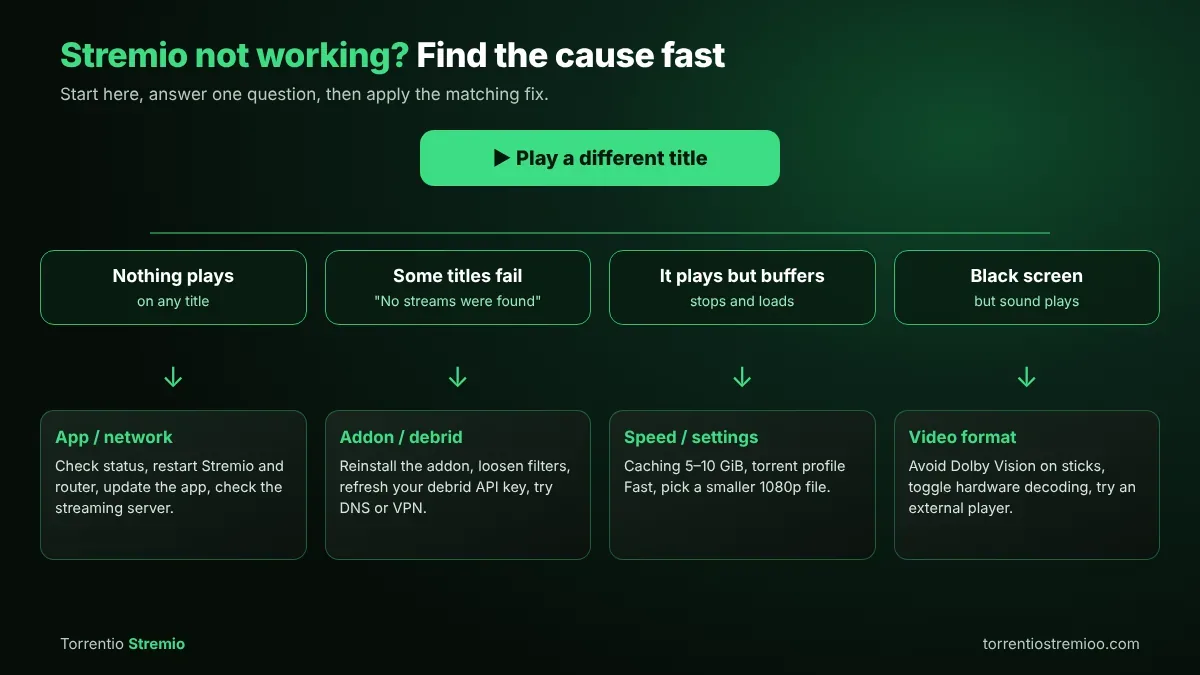
Quick answer: for any Stremio not working problem, first play a different title. If nothing plays, fully close and reopen Stremio and restart your router. If only some titles fail, the problem is your addon or debrid setup, not the app. If the video buffers, open Settings › Streaming, check the streaming server shows no error, and pick a smaller stream.
Stremio not working? Find the cause in 2 minutes
Before you change any setting, match what you see with the table below. It points you straight to the right fix and saves you from reinstalling things that were never broken.
| What you see | Most likely cause | Go to |
|---|---|---|
| "No streams were found" | Addon missing, filtered or blocked | Fix 4, 5 and 7 |
| Endless loading or buffering | Slow source, weak torrent settings or slow Wi-Fi | Fix 8 and 9 |
| Black screen but audio plays | Device cannot decode the video format | Fix 10 and 11 |
| Red screen on a debrid stream | Expired or changed debrid API key | Fix 6 |
| "Stream is not supported" in a browser | Stremio Web cannot reach a streaming server | Fix 3 and 13 |
| App will not open or stays blank | Old version, corrupt cache or blocked network | Fix 1, 2, 14 and 17 |
| Everything fails on every device | Stremio or your internet is down | Check status first |
Is Stremio down right now?
Stremio rarely goes down as a whole, but it does happen. Before you treat it as a Stremio not working problem on your side, run these three checks in under a minute:
- Open the official site. Visit stremio.com and web.stremio.com. If both load, the Stremio service itself is up.
- Test a default addon. Open any movie in Discover. If the poster, description and cast load, Cinemeta (Stremio's built-in catalog addon) is working.
- Check the community. If many people report the same issue at the same time on r/Stremio or r/StremioAddons, it is an outage, and waiting is the fix.
Most of the time the app is fine and only one addon is down. When Torrentio is the addon that fails, our Torrentio addon link guide shows how to reinstall it from the official address.
Why is Stremio not working? The 6 usual causes
Stremio is not one program. It is a chain of parts, and you get Stremio not working errors when any link in that chain breaks:
- The app: an old version, a corrupt cache or a crash.
- The streaming server: the small helper that runs on your device at 127.0.0.1:11470 and handles torrent playback.
- Addons: Stremio has no content of its own. Streams come from addons such as Torrentio, so a broken or badly configured addon means no links.
- Debrid services: Real-Debrid, TorBox and similar services need a valid API key and an active subscription.
- Your network: slow Wi-Fi, ISP blocking, a strict firewall or a VPN that blocks the connection.
- Your device: some TVs and sticks cannot play every video format, especially 4K HDR and Dolby Vision.
Keep this list in mind. Each Stremio not working fix below targets one of these six parts. If you are new to the app, our guide on how to use Stremio explains how these parts fit together.
Fix 1: Fully restart Stremio, your device and router
A simple restart solves more Stremio not working cases than any setting. Closing the window is often not enough, because Stremio keeps its streaming server running in the background.
- Windows: close the window, and if the Stremio icon is still in the system tray, right-click it and quit. Then open the app again.
- Mac: press Cmd + Q to quit, then reopen it.
- Android and Android TV: open the device's app settings, select Stremio and press Force stop.
- Router: unplug it for 30 seconds, then plug it back in.
Fix 2: Update Stremio to the latest version
Old versions are a common reason for Stremio not working after an addon update. Download the newest build from the official site, or update from the Google Play Store on Android and Android TV. On Windows, Stremio 5 brought a complete interface rewrite based on Stremio Web, so if you still use an old 4.x build, updating can fix interface and playback bugs. Installed Stremio by hand on Android? Our Stremio APK guide shows how to update it.
Official Stremio Download Page
Fix 3: Check the Stremio streaming server
When the streaming server is missing, torrents will not play and Stremio Web shows errors. Check it like this:
- Open Settings › Streaming.
- Look at the server URL. The default is
http://127.0.0.1:11470/. - Read the status next to it. It should say Connected. If it says Error, press Reload.
- Still an error? Paste the address above into your browser. If the page does not load, the server is not running on that device. Restart Stremio, and check that your antivirus or firewall is not blocking it.
If you added a custom server URL in the past and no longer use it, remove it. A dead URL in this list is a hidden cause of Stremio not working on some devices.
Fix 4: "No streams were found" — check your addons
This is the most common Stremio not working message people search for. It does not mean the app is broken. It means none of your addons returned a link for that title. Work through these points:
- Is a stream addon installed? Cinemeta shows posters and details but no video links. You need a stream addon. See our list of the best Stremio addons.
- Is the title out yet? Movies still in cinemas usually have no digital release, so addons find nothing.
- Are your filters too strict? If you excluded 720p, 1080p or certain providers, a less popular title may have no results. Review your choices with our Torrentio configure guide.
- Do other titles work? If a popular movie shows streams and a rare one does not, the rare title simply has few sources.
Fix 5: Reinstall or replace a broken addon
Addons are web services, and they can change address or go offline. If one addon stopped giving links, open Addons, uninstall it, then install it again from its official page. Remove copies and old forks. For example, people who still use an outdated Torrentio fork see fewer providers. Install the official addon instead, as shown in our Torrentio install guide.
Use two stream addons, not ten. One main addon plus one backup gives you more links without slowing every search. Our best torrent addons list compares the options.
Fix 6: Refresh your debrid API key
A red screen or an instant error on debrid streams usually means your debrid account is the problem, not Stremio:
- Log in to your debrid website and check that your subscription is active.
- Some services create a new API key when you renew. Copy the current key from your account page.
- Open your addon's configure page, paste the new key and reinstall the addon.
Step-by-step setups are in our Torrentio Real-Debrid guide and our Torrentio TorBox guide.
Fix 7: Get around ISP blocking with DNS or a VPN
In some countries, internet providers block addon addresses or torrent traffic. Signs of this: addons load on mobile data but not on home Wi-Fi, or every torrent link fails while debrid links work. Try these steps in order:
- Switch your device or router DNS to a public resolver such as Cloudflare (1.1.1.1) or Google (8.8.8.8).
- Test the same title on mobile data. If it works there, your home network is the blocker.
- Use a trusted VPN. Read our Torrentio safety guide before you pick one.
Also try the opposite: if a VPN is already on, turn it off for one test. Some VPN servers are blocked by addons, and that alone can make Stremio not working look like an app problem.
Fix 8: Stop buffering with the right streaming settings
Buffering is the Stremio not working complaint we hear most from TV users. Torrent streams buffer when the app cannot download fast enough. Stremio's streaming settings control how hard it tries. In Stremio Web these options appear under Settings › Streaming once the server is connected:
| Setting | Options | What to choose |
|---|---|---|
| Caching | No caching, 2 GiB, 5 GiB, 10 GiB, Infinite | 5 GiB or 10 GiB if you have free storage |
| Torrent profile | Default (5 connections), Soft (35), Fast (200), Ultra fast (400) | Fast on good Wi-Fi, Ultra fast on a strong wired connection |
| Transcoding profile | Disabled, or a hardware option such as NVENC or VideoToolbox | Leave disabled unless you need transcoding |
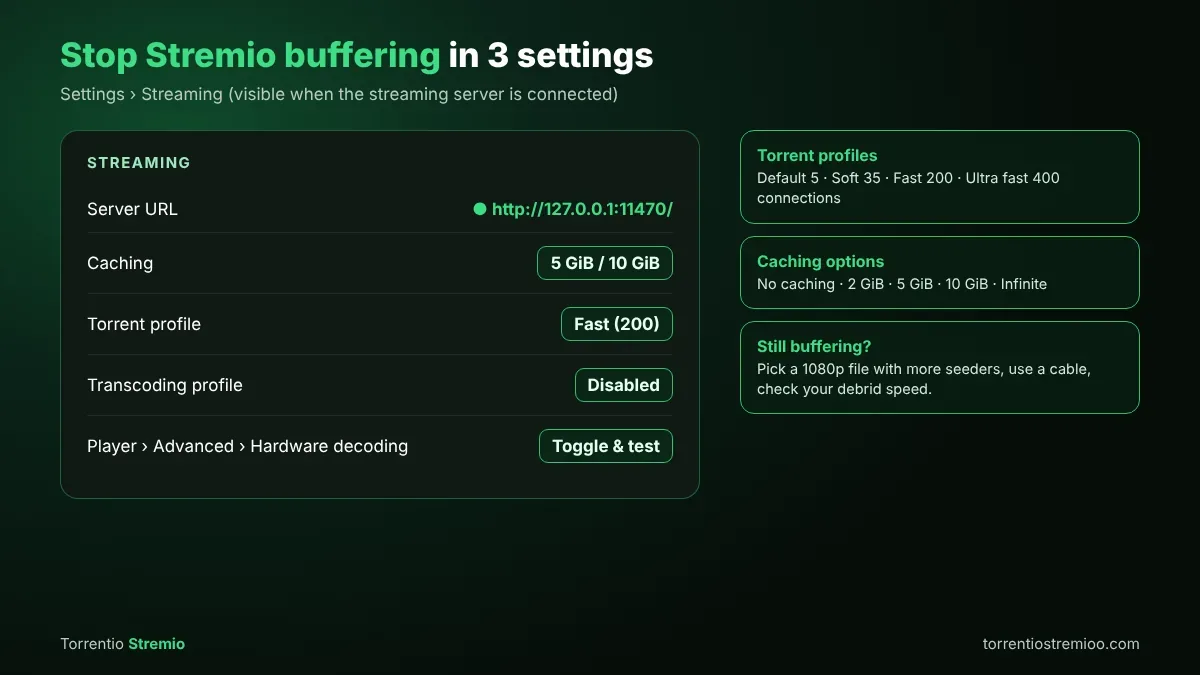
Beyond settings, pick streams with more seeders, use a cable instead of Wi-Fi on TVs, and let the video load for a few seconds before you skip ahead. With a debrid service, buffering usually means the debrid server or your own connection is slow, so run a speed test on the debrid website.
Fix 9: Choose a smaller or more compatible stream
A 60 GB 4K REMUX needs a fast connection and a strong device. If one stream stutters, go back and choose a 1080p file instead. Many TV sticks also struggle with high-bitrate HEVC files. In Torrentio you can sort by size or hide huge files with a size limit, which our configure guide explains.
Fix 10: Black screen with sound? Change the video format
Sound with no picture means your device cannot decode that video. This happens a lot with Dolby Vision files on Fire TV sticks. The Fire TV Stick 4K Max (2nd gen) does not support Dolby Vision profile 7, and files that mix Dolby Vision with HDR10+ can show a black or split picture. Pick a release without "DV" in the name, or choose an HDR10 or SDR copy. Our Torrentio Firestick guide covers the best settings for Fire TV.
Fix 11: Turn hardware decoding on or off
On desktop, Stremio has a Hardware decoding option under Settings › Player › Advanced. It uses your graphics chip instead of the processor. If playback stutters or shows a green or black picture, flip this setting, restart the video and compare. Updating your graphics drivers on Windows also helps.
Fix 12: Play the video in an external player
If the built-in player keeps failing, hand the stream to another player. The Play in external player option sits under Settings › Player › Advanced, and the choices depend on your device:
| Device | External player options |
|---|---|
| Android and Android TV | Allow choosing, VLC, MX Player, Just Player, M3U Playlist |
| iPhone and iPad | VLC, Outplayer, Infuse, Vidhub, M3U Playlist |
| Mac | MPV, IINA, Infuse, M3U Playlist |
| Windows and Linux | M3U Playlist (open it in VLC or mpv) |
External players also fix subtitle formats that the default Android player shows badly. For more on that, see our Stremio subtitles guide.
Fix 13: Stremio Web not working? Connect a streaming server
Stremio Web runs in your browser, but a browser cannot play torrents on its own. It needs a streaming server running on the same computer or network. When it has none, you see "Stream is not supported" or the server status shows Error. Fix it this way:
- Install and open the Stremio desktop app, or the lighter Stremio Service, which runs only the server in the background. It is listed for Windows and, through Flathub, for Linux.
- Reload Settings › Streaming in the browser and wait for Connected.
- Turn off strict blockers for the Stremio site, such as Brave Shields. Users report these can block the local connection.
- Debrid links play over normal HTTP, so they often work in a browser even when torrents do not.
Fix 14: Clear the cache or app data
A damaged cache is a sneaky cause of Stremio not working: the interface goes blank or catalogs fail to load. On Android and Android TV, open the device settings, select Apps › Stremio › Storage and press Clear cache. Try clearing data only if that fails, because it signs you out. In Stremio Web, clear the site data for the Stremio address in your browser.
Fix 15: Log out and log back in
Your addons and library live in your Stremio account. If addons vanished or your library is empty, open Settings, log out, then log in with the same account. Everything syncs back. If you use Stremio without logging in (guest mode), your library and addons are not synced, so log in to keep your setup on every device.
Fix 16: Pause your antivirus, firewall or proxy for one test
Security software can block the local streaming server or addon traffic without telling you. Turn it off for one quick test. If Stremio works, add Stremio as an exception, then turn your protection back on. Do the same with proxy apps and DNS filters on your router.
Fix 17: Reinstall Stremio
When nothing else fixes Stremio not working, uninstall Stremio, restart the device and install a fresh copy from the official site or app store. Your addons and library come back after you log in, so a clean install costs you only a few minutes. Still unhappy after a clean install? Compare the best Stremio alternatives.
Stremio not working on your device? Specific fixes
Some Stremio not working problems only appear on one type of device. Use this table to jump to the fix that fits yours.
| Device | Common problem | Fix |
|---|---|---|
| Android TV and Google TV | Stutter on 4K, black screen | Pick 1080p, try an external player, update from Play Store |
| Fire TV Stick | Black screen on Dolby Vision files | Avoid DV profile 7 releases, use HDR10 or SDR |
| Windows | Server error, green picture | Quit from the tray, update graphics drivers, toggle hardware decoding |
| Mac | Videos fail in Safari | Use the desktop app, or Chrome for Stremio Web |
| Samsung and LG TVs | Fewer formats supported | Choose standard 1080p streams, or cast from a phone |
| iPhone and iPad | Torrents do not play | Use debrid links in Stremio Web, or an external player such as Infuse or VLC |
Common Stremio error messages explained
Each Stremio not working error message points to a different part of the chain. Read the exact words on your screen and match them below.
| Message | What it means | First fix |
|---|---|---|
| No streams were found | Your addons returned no links | Install or reconfigure a stream addon |
| Stream is not supported / Unsupported stream source | The player or browser cannot open this link type | Connect a streaming server or use the app |
| Playback error, please try again | The file failed to start or load | Pick another stream, then try an external player |
| Exo failed to play the video | Android's built-in player cannot decode the file | Choose a different format or an external player |
| ERROR_CODE_IO_BAD_HTTP_STATUS | The link server refused the request | Try another link, refresh your debrid key |
| Streaming server shows Error | The local server is not running or is blocked | Restart Stremio and check your firewall |
When to report a bug to Stremio
If Stremio not working persists after you updated the app, reinstalled it and tested another network, and the same problem appears on every title, you may have found a real bug. Search the official Stremio bug tracker on GitHub first, because many issues already have a thread with a workaround. When you report, include your device, app version, the exact error text and the steps that cause it.
How to stop Stremio not working problems coming back
- Keep Stremio and your addons updated.
- Install addons only from their official pages.
- Use one main stream addon and one backup.
- Renew your debrid plan before it expires, and update the API key if it changes.
- Prefer 1080p on TV sticks and keep 4K for strong devices.
- Log in with an account so a reinstall never costs you your setup.
Follow this list and the next time you face Stremio not working, you will know where to look first.
Final words
With Stremio not working, the app itself is rarely to blame. Test another title to see if the issue is one stream, one addon or everything. Then fix that part: the streaming server for playback errors, addons and debrid keys for missing links, streaming settings and smaller files for buffering, and video formats for black screens. Nine times out of ten, Stremio is working again in a few minutes.
Ready to build a setup that stays reliable? Start with our Torrentio install guide or explore the complete Torrentio Stremio guide.
Frequently Asked Questions
Why is Stremio not working today?
Most of the time the Stremio app is fine and one addon, your debrid account or your network is the problem. Play a different title first. If nothing plays anywhere, restart Stremio and your router, then check whether web.stremio.com loads.
Why does Stremio say "No streams were found"?
None of your stream addons returned a link for that title. Make sure a stream addon such as Torrentio is installed, loosen strict quality or provider filters, and check that the title has a digital release.
How do I stop Stremio from buffering?
Open Settings › Streaming and set Caching to 5 GiB or 10 GiB and the Torrent profile to Fast. Then pick a smaller 1080p stream with more seeders and use a wired connection on TVs if you can.
Why is Stremio Web not working?
A browser cannot play torrents on its own. Stremio Web needs a streaming server, so install the Stremio app or Stremio Service on the same computer and wait for Settings › Streaming to show Connected.
How do I fix a black screen with sound in Stremio?
Your device cannot decode that video format. Choose a release without Dolby Vision, especially on Fire TV sticks, toggle hardware decoding on desktop, or play the stream in an external player such as VLC.
Will reinstalling Stremio delete my addons?
No, as long as you log in with your Stremio account. Your addons and library are saved to the account and sync back after you reinstall and sign in again.