On this page
- 01What is TorBox and why use it with Torrentio?
- 02Which TorBox plan works with Torrentio?
- 03Torrentio TorBox setup: step-by-step guide
- 04What do [TB+] and [TB download] mean in Torrentio?
- 05TorBox catalogs in Stremio: Torrents, Usenet and WebDL
- 06Best Torrentio TorBox settings
- 07Torrentio TorBox not working? Fixes for every error
- 08TorBox vs Real-Debrid for Torrentio
- 09Is Torrentio still active in 2026?
- 10Does TorBox have its own Stremio addon?
- 11Is Torrentio TorBox safe?
- 12Torrentio Lite or full Torrentio with TorBox?
- 13Torrentio TorBox checklist
- 14Final words
- 15FAQs
Torrentio TorBox is the setup where you connect your TorBox account to the Torrentio addon, so Stremio plays cached files from TorBox servers instead of streaming from other peers. Cached results are marked [TB+] and usually start in a few seconds. This guide shows you which TorBox plan works, how to find your API key, how to read the stream labels and how to fix the errors people hit most often.
Quick answer: buy any paid TorBox plan (the free plan has no API access), copy your API key from torbox.app/settings, open the Torrentio configure page, choose TorBox under Debrid Provider, paste the key and press Install. Streams marked [TB+] are ready to play.
What is TorBox and why use it with Torrentio?
TorBox is a paid cloud service, often called a debrid service. It downloads torrents to its own fast servers and then sends the video to you over a normal secure web connection. Torrentio lists TorBox as one of the nine debrid providers it supports, next to RealDebrid, Premiumize, AllDebrid, DebridLink, EasyDebrid, Offcloud, Put.io and HighWay.
When you add TorBox to Torrentio, three things change:
- Faster starts: files TorBox has already stored (cached) play almost instantly, even in 4K.
- No peer-to-peer upload: your device streams from TorBox servers, so it does not share pieces of the file with other torrent users.
- Fewer dead streams: old releases with few seeders often still play if TorBox has a cached copy.
| Feature | Free Torrentio (P2P) | Torrentio TorBox |
|---|---|---|
| Cost | Free | From $3 per month |
| Start time | Depends on seeders | Seconds for [TB+] files |
| Your device uploads to peers | Yes | No |
| Old or rare releases | Often slow or dead | Play if cached |
| Your TorBox library in Stremio | No | Yes, as catalogs |
Who should use Torrentio TorBox?
- TV and Firestick users who are tired of buffering on free streams.
- 4K and HDR fans, because large files play smoothly from TorBox servers.
- People with slow upload speeds or strict home networks, since nothing is uploaded to peers.
- Anyone who wants Usenet in Stremio, through the Pro plan.
If you only watch now and then and free streams start fine for you, plain Torrentio is enough. For daily viewers, Torrentio TorBox is a small monthly cost for a much smoother experience.
Which TorBox plan works with Torrentio?
This is the part most guides skip. We checked the official TorBox pricing page on October 26, 2026. The free plan does not include API access or third-party apps, and Torrentio needs both. That means a free account cannot power Torrentio TorBox streams. Every paid plan works.
| Plan | Price | Works with Torrentio? | Concurrent slots | Max per download | Storage | Usenet |
|---|---|---|---|---|---|---|
| Free | $0 | No (no API access) | 1 | 10GB | None | No |
| Essential | $3/mo | Yes | 3 | 200GB | 300GB | No |
| Standard | $5/mo | Yes | 5 | 200GB | 500GB | No |
| Pro | $10/mo | Yes | 10 | 1TB | 1TB | Yes |
Our pick: Essential is enough for one household that mostly plays cached [TB+] streams. Choose Pro if several people watch at the same time, if you want Usenet downloads, or if you often start new downloads that use up your slots. Prices can change, so confirm them on the TorBox pricing page before you pay.
Torrentio TorBox setup: step-by-step guide
The whole Torrentio TorBox setup takes about five minutes. You need a paid TorBox account, Stremio, and a browser.
Step 1: Copy your TorBox API key
- Log in at torbox.app.
- Open Settings and scroll to the API Key section.
- Copy the key. It is a long string of letters and numbers.
Tip: the Find API Key link on the Torrentio configure page opens torbox.app/settings for you, so you do not have to search for it.
Treat the key like a password. Anyone who has it can use your TorBox plan and see your library. If it ever leaks, reset the key in your TorBox settings and repeat this setup.
Step 2: Add TorBox on the Torrentio configure page
- Open the official Torrentio configure page.
- Pick your providers, sorting and quality filters (our recommended Torrentio TorBox settings are below).
- Under Debrid Provider, choose TorBox.
- Paste your key into the API Key field.
- Decide on the two extra options: Don't show download to debrid links and Don't show debrid catalog. Both are explained further down.
Torrentio saves everything inside your personal addon link. With TorBox selected, the link gains a part that looks like torbox=YOUR_API_KEY. Learn how these links work in our Torrentio addon link guide.
Step 3: Install and test
- Press Install and confirm in Stremio. If nothing happens, press Copy Link and paste it into the search box under Add-ons in Stremio.
- Go to Add-ons › Installed and uninstall any older Torrentio entry, so you only keep the TorBox version.
- Open a popular movie. You should see streams that start with [TB+] Torrentio. Play one to confirm.
Because Stremio stores addons in your account, the Torrentio TorBox addon now appears on every phone, TV and computer where you sign in. First time installing addons? Our guide on how to install Torrentio on Stremio has the basics.
Shortcut: open our Torrentio TorBox preset
Want to skip the settings? Open the address below in your browser. The Torrentio configure page loads with our recommended options already selected: sorted by quality then size, Cam and Screener hidden, five results per quality, download links and the debrid catalog turned off.
https://torrentio.strem.fun/sort=qualitysize|qualityfilter=scr,cam|limit=5|debridoptions=nodownloadlinks,nocatalog/configure
Now choose TorBox under Debrid Provider, paste your key and press Install. We tested this preset on October 26, 2026: both debrid options stay ticked after you pick TorBox. Your key never goes into the address bar, which is safer than editing links by hand.
Setting up Torrentio TorBox on Android TV or Firestick
Do not type a long API key with a TV remote. Do the setup on your phone or computer instead, while signed in to the same Stremio account as your TV. Then reopen Stremio on the TV: the Torrentio TorBox addon is already there under Add-ons › Installed. Need to install Stremio itself first? See our Torrentio Firestick guide.
What do [TB+] and [TB download] mean in Torrentio?
With TorBox connected, Torrentio adds a short tag in front of each stream name. "TB" is Torrentio's short name for TorBox, the same way "RD" stands for Real-Debrid.
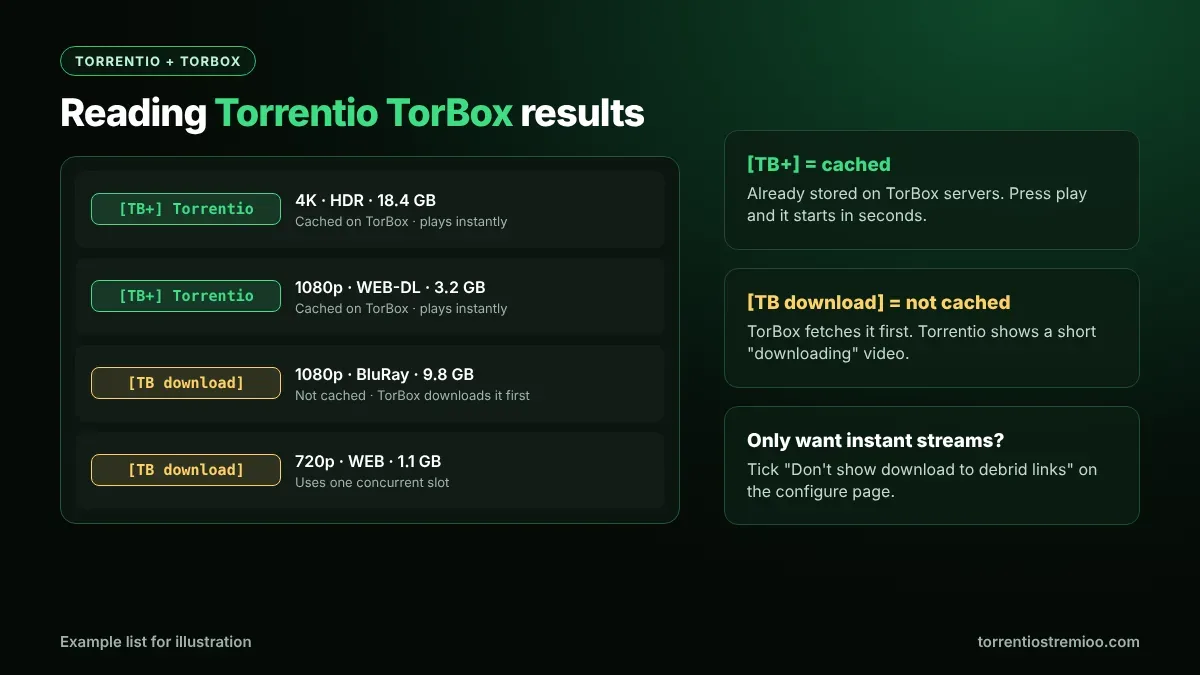
| Tag | Meaning | What happens when you click it |
|---|---|---|
| [TB+] | The file is already cached on TorBox | Plays straight away from TorBox servers |
| [TB download] | Not cached yet, but the torrent has seeders | TorBox starts downloading it and Torrentio shows a short "downloading" video. Come back later and it becomes [TB+] |
| No tag | Plain peer-to-peer stream | Appears only if TorBox is not set up in your Torrentio link |
Each [TB download] click uses one of your concurrent slots until TorBox finishes. On the Essential plan you only have three, so clicking many download links in a row can block new ones for a while. If you only want instant playback, tick Don't show download to debrid links. Your list will then show [TB+] streams only.
Why some releases are [TB+] and others are not
A file becomes cached once it has been downloaded to TorBox, usually because another user requested it earlier. Popular movies and series are almost always cached in several qualities. Brand-new episodes, niche foreign films and very old releases may not be cached yet. In practice:
- Sort by quality then size and scan the list for the first [TB+] tag in the quality you want.
- Keep more providers on. Every extra provider gives Torrentio more releases to check against the TorBox cache.
- Be patient with new episodes. They often turn into [TB+] within a few hours of release.
TorBox catalogs in Stremio: Torrents, Usenet and WebDL
Torrentio can also show your own TorBox library inside Stremio. For TorBox it adds three catalogs: Torrents, Usenet and WebDL. They list the files saved in your TorBox account, so you can play something you added on the TorBox website straight from your TV.
- Useful if you add files to TorBox from other apps or the website.
- The Usenet catalog only fills up on the Pro plan, because the cheaper plans do not include Usenet downloads.
- Do not want extra rows on your Stremio home screen? Tick Don't show debrid catalog on the configure page and reinstall.
Best Torrentio TorBox settings
Debrid users can ignore seeders, so the best Torrentio TorBox settings look a little different from the free setup in our Torrentio configure guide:
| Setting | Recommended | Why |
|---|---|---|
| Providers | Keep all general providers, plus your language | More sources mean more chances of a cached copy |
| Sorting | By quality then size | Puts the best bitrate first. Speed comes from TorBox, not seeders |
| Exclude qualities | Cam, Screener | Low-quality recordings. Add 480p on a 4K TV |
| Max results per quality | 5 | Short list, easy to scroll with a remote |
| Video size limit | Empty | Big files play fine from TorBox |
| Don't show download to debrid links | On for Essential, off for Pro | Saves your three slots for instant [TB+] playback |
| Don't show debrid catalog | On, unless you use your TorBox library | Keeps the Stremio home screen clean |
Torrentio TorBox not working? Fixes for every error
When something goes wrong, Torrentio does not just fail silently. It plays a short video message that names the problem. We matched each message to the TorBox error behind it, using the public Torrentio source code.
| What you see | Cause on TorBox | Fix |
|---|---|---|
| Failed access video | Wrong or reset API key, or a plan without API access (the free plan) | Copy the key again from torbox.app/settings and reinstall. Upgrade to Essential if you are on Free |
| Limits exceeded video | All concurrent slots busy, a monthly or cooldown limit, or too many requests | Wait a few minutes, remove stuck downloads in your TorBox dashboard, or pick a [TB+] stream |
| Too big video | The file is larger than your plan allows (200GB on Essential and Standard) | Choose a smaller file or move to Pro |
| Downloading video | The file is not cached yet, or is already in your download queue | Wait for TorBox to finish, then open the stream again |
| No [TB+] tags at all | An old Torrentio link without your key is still installed | Uninstall every Torrentio entry, then install your TorBox link again |
| No streams of any kind | Filters too strict or a short Torrentio outage | Loosen quality filters, then test the link as shown in our addon link guide |
One more check: if a title shows [TB download] but never turns into [TB+], the torrent may have too few seeders for TorBox to finish it. Pick another release with the same quality.
TorBox vs Real-Debrid for Torrentio
Both services work with Torrentio in the same way. The main differences are price, plan structure and extras:
| Feature | TorBox | Real-Debrid |
|---|---|---|
| Tag in Torrentio | [TB+] | [RD+] |
| Free plan for Torrentio | No (paid plans from $3/mo) | No (premium needed) |
| Usenet | Yes, on Pro | No |
| Library catalogs in Stremio | Torrents, Usenet, WebDL | One catalog |
| Where to find the key | torbox.app/settings | real-debrid.com/apitoken |
Many users keep one service only, because running two debrid links doubles every result. If you prefer Real-Debrid, follow our Torrentio Real-Debrid setup guide instead.
How to switch from Real-Debrid to Torrentio TorBox
Moving from Real-Debrid takes two minutes, and you keep all of your current settings:
- In Stremio, open Add-ons › Installed, select Torrentio and use Share addon to copy your current link.
- Replace /manifest.json at the end of that link with /configure and open it in a browser. Your providers, sorting and filters load automatically.
- Change Debrid Provider from RealDebrid to TorBox and paste your TorBox key.
- Press Install, then uninstall the old Real-Debrid version of Torrentio.
Your [RD+] tags are now [TB+] tags, and nothing else in Stremio changes.
Is Torrentio still active in 2026?
Yes. On October 26, 2026 the official manifest at torrentio.strem.fun still answered with version 0.0.15. The project is also under active development. The public code history shows that on October 24, 2026 the developer replaced the old Node.js server with a new version written in Rust. October 2026 also brought several TorBox fixes, including better handling of TorBox login errors and of torrents that contain a single video.
The rewrite matters for debrid users. In the developer's own benchmark, published with the code, the Rust server handled about 30,200 requests per second that include a TorBox availability check, compared with about 14,000 for the old Node.js setup running four workers. It also uses far less memory, which should mean fewer slowdowns at busy times.
For you, nothing changes: the same Torrentio TorBox link keeps working, and you do not need to reinstall anything because of the update.
Does TorBox have its own Stremio addon?
Not anymore. TorBox used to run an addon at stremio.torbox.app, but when we tested that address on October 26, 2026, it no longer existed. Today you use TorBox through a third-party addon that supports it. Torrentio is the most popular choice, and Comet, MediaFusion and AIOStreams also accept a TorBox key. Compare them in our list of the best torrent addons for Stremio. Wondering whether Comet beats Torrentio for TorBox users? Read our Torrentio vs Comet test.
Using the Nuvio player? It accepts the same Torrentio TorBox link: open Settings › Addons › Add Addon, paste the link and tap Install Addon.
Is Torrentio TorBox safe?
With TorBox, your device streams from TorBox servers over an encrypted connection and does not upload to torrent peers. Your two main risks are a leaked API key and the content you choose to watch. Keep the key private, never share a link that contains it, and stick to content you have the right to view. Our guide is Torrentio safe and legal? covers privacy and VPN questions in more detail.
Do you need a VPN with Torrentio TorBox?
It is less important than with free streaming. In a Torrentio TorBox setup, TorBox fetches the torrent on its own servers, and your device only receives a normal encrypted video stream, so your home IP address is not visible in torrent swarms. A VPN is still useful if you also watch free P2P streams, or if you simply want more privacy from your internet provider.
Torrentio Lite or full Torrentio with TorBox?
Both versions accept a TorBox key, so either works. For debrid users, though, the full version is usually the better choice. Torrentio Lite searches 14 providers instead of 25, which means fewer releases to check against the TorBox cache and sometimes fewer [TB+] results, especially for non-English content. If you like Lite's short list, you can get the same clean look on the full version by setting max results per quality to 1 or 2. Read the full comparison in Torrentio Lite vs Torrentio.
Torrentio TorBox checklist
- A paid TorBox plan (Essential or higher), because the free plan has no API access.
- Your API key copied from torbox.app/settings and kept private.
- TorBox selected under Debrid Provider on the Torrentio configure page.
- Sorting set to quality then size, with Cam and Screener hidden.
- Only one Torrentio entry under Add-ons › Installed.
- [TB+] tags visible when you open a popular movie.
If every item is ticked, your Torrentio TorBox setup is complete and ready on all of your devices.
Final words
A Torrentio TorBox setup is one of the cheapest ways to get fast, buffer-free streams in Stremio. Skip the free TorBox plan, start with Essential, paste your key on the configure page and look for the [TB+] tag. If a stream ever fails, the short video message tells you exactly which fix from the table above to use.
New to all of this? Start with our complete Torrentio Stremio guide.
Frequently Asked Questions
Can I use TorBox with Torrentio?
Yes. Open the Torrentio configure page, choose TorBox under Debrid Provider, paste your TorBox API key and press Install. Cached streams then appear with a [TB+] tag in Stremio.
Does the free TorBox plan work with Torrentio?
No. The free TorBox plan does not include API access or third-party apps, which Torrentio needs. Any paid plan works, starting with Essential at $3 per month (price checked October 26, 2026).
What does TB+ mean in Torrentio?
TB is short for TorBox. [TB+] means the file is already cached on TorBox and plays straight away. [TB download] means TorBox has to download the file first.
Where do I find my TorBox API key?
Log in at torbox.app, open Settings and copy the key from the API Key section. The Find API Key link on the Torrentio configure page opens that page directly.
Is TorBox better than Real-Debrid for Torrentio?
Both work the same way in Torrentio. TorBox has cheaper entry plans, Usenet on the Pro plan and three library catalogs, while Real-Debrid is the older, more widely used service. Pick one and use only one debrid link at a time.
Does TorBox have its own Stremio addon?
Not anymore. The old stremio.torbox.app address no longer works, so you use TorBox through addons that support it, such as Torrentio, Comet, MediaFusion or AIOStreams.