On this page
- 01Official Torrentio addon link (copy and paste)
- 02What is the Torrentio addon link (manifest.json)?
- 03How to create a custom Torrentio addon link
- 04Ready-made Torrentio addon links you can copy
- 05Default vs custom Torrentio addon link: which one should you use?
- 06How to add the Torrentio addon link to Stremio on any device
- 07Torrentio addon link with Real-Debrid, TorBox and other debrid services
- 08How to find or change the Torrentio link you already installed
- 09Fake Torrentio links and APKs to avoid
- 10Torrentio addon link not working? Quick fixes
- 11Final words
- 12FAQs
The Torrentio addon link is the web address that installs Torrentio inside Stremio. The official one is https://torrentio.strem.fun/manifest.json, and every custom version you create on the configure page is built on top of it. In this guide you get every working link, learn what each part of the address means, and see how to add it on PC, Android, TV, iPhone and Nuvio in under two minutes.
Quick answer: copy https://torrentio.strem.fun/manifest.json, open Stremio, go to Add-ons, paste the link into the search box and press Install. Want your own sorting, quality filters or Real-Debrid? Build a personal Torrentio addon link at torrentio.strem.fun/configure and press Copy Link.
Official Torrentio addon link (copy and paste)
We opened the official manifest on October 24, 2026. It reports Torrentio v0.0.15 with 25 torrent providers and support for nine debrid services. These are the only addresses you need:
| Link | Address | Use it when |
|---|---|---|
| Default Torrentio addon link | https://torrentio.strem.fun/manifest.json | You want the standard setup with all providers. |
| Configure page | https://torrentio.strem.fun/configure | You want to change settings and make a personal link. |
| Torrentio Lite link | https://torrentio.strem.fun/lite/manifest.json | You prefer a short list with English and anime sources. |
| One-click app link | stremio://torrentio.strem.fun/manifest.json | The Stremio app is installed on the same computer or phone. |
All of these point to the same server run by the Torrentio developer. Nothing is downloaded to your device: the link only tells Stremio where to ask for streams. If you are torn between the full and the Lite version, our Torrentio Lite vs Torrentio comparison explains the difference.
What is the Torrentio addon link (manifest.json)?
Every Stremio addon is described by a small text file called manifest.json. When you paste the Torrentio addon link, Stremio reads that file to learn the addon's name, version and logo, and what it can do. If you open the link in a normal browser you will only see a block of code. That is expected and simply means the link is alive.
Here is what the Torrentio manifest tells Stremio, in plain English:
- ID and version: com.stremio.torrentio.addon, version 0.0.15.
- What it provides: streams only. It answers when you open a movie, a series episode or an anime.
- Which titles it understands: IMDb IDs (they start with "tt") and Kitsu IDs for anime.
- Catalogs: none. Torrentio does not add rows to your Stremio home screen. You still find titles through Cinemeta or another catalog addon, and Torrentio fills in the stream list when you open one.
- Configurable: yes, but setup is optional. The plain link works without any changes.
That catalog point confuses many new users. If you install Torrentio and see nothing new on the Board, it is not broken. Open any film and the Torrentio streams appear in the list on the right side.
Why Torrentio uses a link instead of an app
Torrentio is a remote addon. It runs on the developer's server, and Stremio sends it a short request every time you open a title. That design has clear benefits for you:
- No updates to install. When the developer improves Torrentio, every user gets the change at once.
- Works on every device. The same link runs on Windows, Android, TV, the web app and Nuvio.
- Nothing stored on your device. The addon takes no space and has no access to your files.
The only downside is that you depend on that server. If it goes offline for a while, the link stops returning streams until it is back.
How to create a custom Torrentio addon link
The default address shows every provider and every quality, which can mean a very long list. Most people get a cleaner result by building a personal Torrentio addon link. It takes about two minutes:
- Open the official Torrentio configure page.
- Choose your providers, sorting, priority language, quality filters and size limit.
- Optional: pick a debrid service and paste your API key.
- Press Install to send the link straight to Stremio, or press Copy Link to paste it yourself.
Not sure which options to choose? Our Torrentio configure guide explains every setting and gives ready-made presets for phones, 4K TVs and anime fans.
How your settings are saved inside the Torrentio addon link
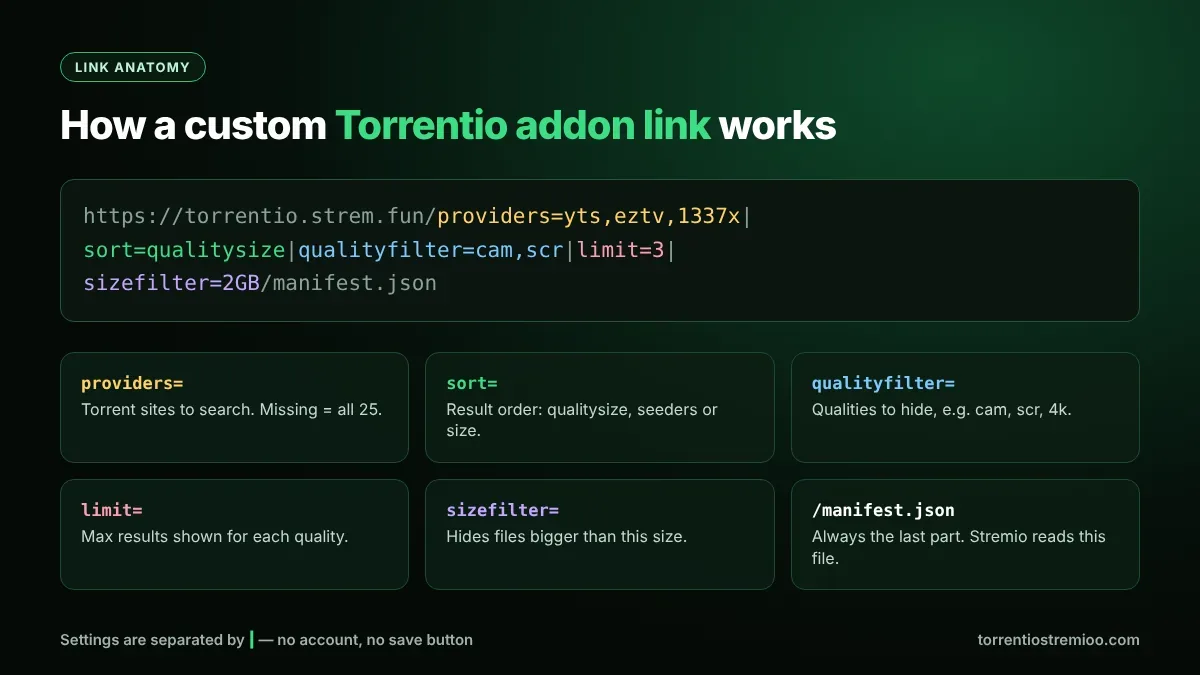
Torrentio has no accounts and no save button. Instead, every choice is written into the address itself, between the domain and /manifest.json, with a straight line (|) between settings. Here is a real link we generated on the configure page:
https://torrentio.strem.fun/providers=yts,eztv,1337x|sort=qualitysize|qualityfilter=cam,scr|limit=3|sizefilter=2GB/manifest.json
| Part of the link | What it does | Example values |
|---|---|---|
| providers= | Torrent sites Torrentio searches. If it is missing, all 25 are used. | yts, eztv, 1337x, nyaasi |
| sort= | Order of results. If it is missing, results are sorted by quality, then seeders. | qualitysize, seeders, size |
| qualityfilter= | Qualities you want to hide. | cam, scr, 4k, 480p |
| limit= | Maximum number of results for each quality. | 3 |
| sizefilter= | Largest file size that is shown. | 2GB, 500MB |
| language= | Language moved to the top of the list. | spanish, french, hindi |
| realdebrid= (or another debrid name) | Your personal debrid API key. | Keep this part secret |
Because the settings live in the address, two people with the same options get the exact same link. It also means you cannot edit a link after installing it. To change anything, you make a new Torrentio addon link and install it in place of the old one.
Ready-made Torrentio addon links you can copy
Do not want to tick boxes? We built and tested these five custom links on October 24, 2026. Each one opened a valid manifest. Copy the one that matches your setup and paste it into Stremio. None of them contain a debrid key, so they are safe to use as they are.
Phone or mobile data
Hides 4K, BluRay REMUX, Cam and Screener files, shows three results per quality and skips anything over 2GB. Ideal for small screens and limited data.
https://torrentio.strem.fun/qualityfilter=brremux,4k,scr,cam|limit=3|sizefilter=2GB/manifest.json
1080p TV on home Wi-Fi
Removes 3D, Cam and Screener releases and keeps five results per quality, which is easy to scroll with a remote.
https://torrentio.strem.fun/qualityfilter=threed,scr,cam|limit=5/manifest.json
4K TV with fast internet
Sorts by quality, then file size, so the highest bitrate copy sits at the top. 480p, Cam and Screener files are hidden. This works best with a debrid service.
https://torrentio.strem.fun/sort=qualitysize|qualityfilter=480p,scr,cam|limit=5/manifest.json
Spanish and Latino audio first
Moves Castilian and Latin American Spanish releases to the top and hides low-quality recordings.
https://torrentio.strem.fun/language=spanish,latino|qualityfilter=scr,cam/manifest.json
Hindi audio first
Puts Hindi releases first for Indian viewers, with Cam and Screener removed.
https://torrentio.strem.fun/language=hindi|qualityfilter=scr,cam/manifest.json
Tip: want one of these presets with Real-Debrid or another debrid service? Replace /manifest.json at the end of the link with /configure and open it in your browser. The configure page loads with those settings already filled in. Add your key, then press Install.
Default vs custom Torrentio addon link: which one should you use?
| Feature | Default link | Custom link |
|---|---|---|
| Setup time | A few seconds | About two minutes |
| Providers | All 25 | Only the ones you pick |
| Cam and Screener files | Shown | Can be hidden |
| Debrid support | No | Yes |
| Safe to share | Yes | Only if it has no debrid key |
| Best for | A first test of Torrentio | Daily use on any device |
Our advice is simple: start with the default Torrentio addon link to check that everything works, then switch to a custom link or one of the presets above for a shorter, cleaner list.
How to add the Torrentio addon link to Stremio on any device
Stremio saves your addons to your Stremio account, not to a single device. Add the link once while you are signed in and it shows up everywhere you use the same account. Pick the method that suits your device. New to Stremio itself? Read our beginner guide on how to use Stremio first.
Windows, Mac and Linux
- Install the Stremio desktop app from the official Stremio downloads page and sign in.
- On the configure page, press Install. Your browser asks to open Stremio. Allow it.
- Stremio shows the Torrentio card. Press Install again to confirm.
- If nothing opens, copy the Torrentio addon link, click the puzzle icon (Add-ons) in Stremio, paste the link into the search box and press Install.
Need screenshots for every step? Follow our full guide on how to install Torrentio on Stremio.
Android phones and tablets
Open the configure page in Chrome and tap Install. Android passes the stremio:// address to the Stremio app, which opens the install screen. If you only have the https version of the link, copy it, open Stremio, tap Add-ons and paste it into the search bar at the top.
Android TV, Google TV and Firestick
Typing a long address with a TV remote is slow and easy to get wrong. This method is much faster:
- Sign in to the same Stremio account on your TV and on your phone or computer.
- Add the Torrentio addon link on the phone or computer using the steps above.
- Reopen Stremio on the TV. Torrentio now appears under Add-ons › Installed without typing anything.
No phone or computer nearby? Open Add-ons on the TV and type the default Torrentio addon link with the on-screen keyboard. It is only 41 characters long, while a custom link can easily pass 100. Once it works, you can switch to a custom link later from any other device.
Using an Amazon device? Our Torrentio Firestick guide also shows how to install Stremio itself.
iPhone and iPad
The Stremio downloads page lists two options for iOS: a limited web version and a full app offered through AltStore PAL in Europe, Brazil and Japan. Everywhere else, the browser version is the easiest route:
- Open web.stremio.com in Safari and sign in.
- Tap the puzzle icon (Add-ons) and paste the Torrentio addon link into the Search addons box.
- Tap Install on the Torrentio card.
You can also open this ready-made address. It brings up the Torrentio install screen in Stremio Web directly (we tested it on October 24, 2026):
https://web.stremio.com/#/addons?addon=https%3A%2F%2Ftorrentio.strem.fun%2Fmanifest.json
For a custom setup, paste your own link into the search box instead.
Nuvio
Nuvio is a free, open-source player that supports Stremio addons. It accepts the same Torrentio addon link:
- Copy your Torrentio link (default or custom).
- In Nuvio, open Settings › Addons.
- Choose Add Addon, paste the link into Addon URL and tap Install Addon.
Your Torrentio settings behave the same way in Nuvio, because they travel inside the link.
Torrentio addon link with Real-Debrid, TorBox and other debrid services
When you pick a debrid service on the configure page, Torrentio adds your API key to the address. The manifest lists nine supported services: RealDebrid, Premiumize, AllDebrid, DebridLink, EasyDebrid, Offcloud, TorBox, Put.io and HighWay.
A debrid link looks like a normal one with one extra part, for example realdebrid=YOUR_API_KEY. Stremio then plays cached files from the debrid servers instead of streaming from other peers, which usually means faster starts and less buffering.
Keep it private: anyone who has your debrid Torrentio addon link can use your paid subscription. Never post it on Reddit, Discord or in screenshots. If it leaks, reset the API key in your debrid account and build a fresh link.
Step-by-step help with keys and the extra debrid options is in our Torrentio Real-Debrid setup guide. Using TorBox instead? Follow our Torrentio TorBox setup guide.
Can you share one Torrentio addon link with family?
A link without a debrid key is fine to share. It holds nothing personal, so anyone can paste it into their own Stremio account. A link with a debrid key is different. Debrid services usually allow one account per household, and many of them block accounts that stream from several locations at the same time. If family members in other homes want debrid, each person should get their own plan and their own link.
How to find or change the Torrentio link you already installed
Lost your link? You can get it back without starting from scratch:
- Stremio Web and desktop: open Add-ons › Installed. The Torrentio card has a Share addon option that shows the full address so you can copy it.
- Any device: open the configure page again, choose the same options and copy the new link. The same options always give the same address (you only need to paste your debrid key again).
How to edit your current Torrentio addon link
Here is a trick most guides miss. Take your existing link and replace /manifest.json at the end with /configure. Open that address in a browser and the configure page loads with all of your current settings already selected. Change what you need, press Install, and you are done.
After installing, remove the old entry under Add-ons › Installed. Running two Torrentio links at once doubles every result and makes the list hard to read.
Fake Torrentio links and APKs to avoid
Torrentio is popular, so copycat sites use its name. Stay safe with these simple rules:
- Use only torrentio.strem.fun. It is the domain named inside the official manifest. Look-alike domains can change the link or collect your debrid key.
- There is no Torrentio APK or iOS app. Torrentio is a web addon. Any "Torrentio APK" download does not come from the developer and may contain adware.
- Test old mirrors before you trust them. Some older guides still point to torrentio.elfhosted.com. When we tested it on October 24, 2026, it returned a 404 error, so it is not a working Torrentio addon link today.
- Check the source if you like. The Torrentio code is public on GitHub (TheBeastLT/torrentio-scraper).
Want to know more about privacy and VPN use? Read our guide: is Torrentio safe and legal?
Torrentio addon link not working? Quick fixes
How to test your Torrentio addon link in 10 seconds
- Paste the link into a normal browser tab and press Enter.
- If you see text that starts with {"id":"com.stremio.torrentio.addon", the link and the server are both fine. Any problem is inside Stremio.
- If the page shows an error or keeps loading, the address is wrong or the server is having a short outage. Copy the link again from the configure page and try once more.
- Finally, open a popular movie in Stremio. If Torrentio streams show up there, everything works.
Still stuck? Match your problem in the table below.
| Problem | Likely cause | Fix |
|---|---|---|
| Install button does nothing | The browser cannot open stremio:// links, or Stremio is not installed on that device | Press Copy Link and paste it into the Add-ons search box in Stremio |
| Stremio says the addon cannot be loaded | A missing part of the address, an extra space or a short server outage | Copy the link again and make sure it ends with /manifest.json |
| The link shows code in the browser | You opened the manifest file itself | Normal. Paste the link into Stremio, not into the browser |
| Installed, but no streams | Filters too strict, an expired debrid plan or a rare title | Remove the size limit and some quality filters, then reinstall |
| Every result appears twice | Two Torrentio links are installed | Uninstall the older one under Installed |
| Works on the phone, missing on the TV | Different Stremio accounts | Sign in with the same account on both devices |
If the official address does not open for anyone, the Torrentio server is having a temporary outage. Wait a while, and avoid "fixed" links from unknown sites in the meantime. If you want a backup addon for those moments, see our list of the best torrent addons for Stremio.
Final words
You only ever need one trusted source: torrentio.strem.fun. Use the default Torrentio addon link for a quick start, or build a personal one on the configure page for a cleaner, faster list. Keep any link that contains a debrid key to yourself, install it once on your Stremio account, and it follows you to every device.
New to all of this? Start with our complete Torrentio Stremio guide.
Frequently Asked Questions
What is the official Torrentio addon link?
The official Torrentio addon link is https://torrentio.strem.fun/manifest.json. You can build a personal version with your own sorting, filters and debrid key at torrentio.strem.fun/configure.
Where do I paste the Torrentio addon link in Stremio?
Open Stremio, click the puzzle icon to go to Add-ons, paste the link into the search box at the top and press Install on the Torrentio card.
Is there a Torrentio APK download?
No. Torrentio is a web addon that runs inside Stremio, so you only need the Stremio app and the addon link. Avoid any site that offers a Torrentio APK.
Does one Torrentio link work on all my devices?
Yes. Stremio saves addons to your account, so a link installed on one device appears on every phone, TV or computer where you sign in with the same account.
Is the Torrentio link shared on Reddit different?
No. The r/StremioAddons community points to the same official domain, torrentio.strem.fun. Never use a personal link someone else posted, because it may contain their debrid key or unusual settings.
Can I use the Torrentio addon link in Nuvio?
Yes. In Nuvio open Settings, then Addons, choose Add Addon, paste the link into Addon URL and tap Install Addon. Your settings work the same as in Stremio.