On this page
- 01How we picked these Stremio addons
- 02What are Stremio addons?
- 03The 6 default Stremio addons (keep them)
- 04Best Stremio addons for streams
- 05Best Stremio addons for catalogs and metadata
- 06Best Stremio addons for subtitles
- 07Best Stremio addons for tracking and extras
- 08Our top 5 picks explained
- 09Best addons for specific situations
- 10How to install Stremio addons (3 ways)
- 11How to remove or update Stremio addons
- 12Recommended Stremio addon setups
- 13How many Stremio addons should you install?
- 14Stremio addons vs Kodi add-ons
- 15Are Stremio addons safe?
- 16Do Stremio addons work on every device?
- 17How to find new Stremio addons
- 18Stremio addons not working? Quick fixes
- 19Final words
- 20FAQs
Stremio addons decide what you can watch in Stremio. The app on its own shows posters and trailers, but addons add the catalogs, streams, subtitles and tracking that turn it into a full media center. This guide lists the 25 most useful Stremio addons by category, shows three ways to install them, and gives you ready-made setups for free users, debrid users and anime fans.
Quick answer: keep the six default addons, then add Torrentio for streams, Streaming Catalogs or The Movie Database Addon for better browsing, and opensubtitles PRO or SubSource for extra subtitles. Install each one by pasting its link into Stremio's search bar and pressing Install. Two or three stream addons are enough.
How we picked these Stremio addons
Most "best addons" pages are copied lists that never get updated. The top Google result for this topic, a GitHub list, was archived in November 2025 and now says it is no longer maintained. So we built our own list on November 1, 2026:
- We started from stremio-addons.net, the community catalog that replaced the old GitHub list. It listed 677 addons on the day we checked.
- We took the most-starred addons in each category and noted their current version and star count.
- We opened the manifest of key addons ourselves to confirm they are online.
- We left out adult addons and live TV addons that rebroadcast paid channels without permission. They break often and can get you into legal trouble.
What are Stremio addons?
Stremio addons are small online services that plug into the app. Each one can provide one or more of four things:
| Addon type | What it adds | Example |
|---|---|---|
| Catalog | Rows of titles on the Board and in Discover | Streaming Catalogs |
| Metadata | Posters, descriptions, cast and episode lists | Cinemeta, TMDB Addon |
| Streams | The actual video links you press play on | Torrentio, Comet |
| Subtitles | Subtitle files in your language | OpenSubtitles v3 |
Nothing is downloaded to your device when you install one. Stremio simply saves the addon's link to your account and asks it for data when you browse or open a title. New to the app itself? Start with our guide on how to use Stremio.
Behind the scenes, addons talk to each other through shared IDs. When you open a movie from any catalog, Stremio passes its IMDb ID (or a Kitsu ID for anime) to every stream and subtitle addon you have installed. That is why a catalog addon from one developer and a stream addon from another work together without any setup on your side.
Official vs community addons
Stremio's own team maintains a handful of official addons, including Cinemeta, OpenSubtitles v3, YouTube, WatchHub, Public Domain Movies and Local Files. Everything else, including Torrentio, is a community addon built by independent developers. Community addons are where most of the useful features live, but they also come and go. Before you rely on one, check that it was updated recently and that its website or configure page still loads.
The 6 default Stremio addons (keep them)
Every new Stremio setup already includes six addons. We checked them in Stremio Web on October 31, 2026:
| Addon | Version | Why keep it |
|---|---|---|
| Cinemeta | 3.0.14 | Powers the main movie and series catalogs, search and episode lists |
| OpenSubtitles v3 | 1.0.0 | Built-in subtitles for movies and series |
| YouTube | 1.30.7 | Your favourite YouTube channels, ad-free |
| WatchHub | 1.15.0 | Shows where a title is available on paid services |
| Public Domain Movies | 1.0.0 | Free, legal streams for more than 500 classic films |
| Local Files | 1.10.0 | Plays video and .torrent files from your own device |
Removing Cinemeta is the most common beginner mistake. Without it, search and many catalogs stop working.
Best Stremio addons for streams
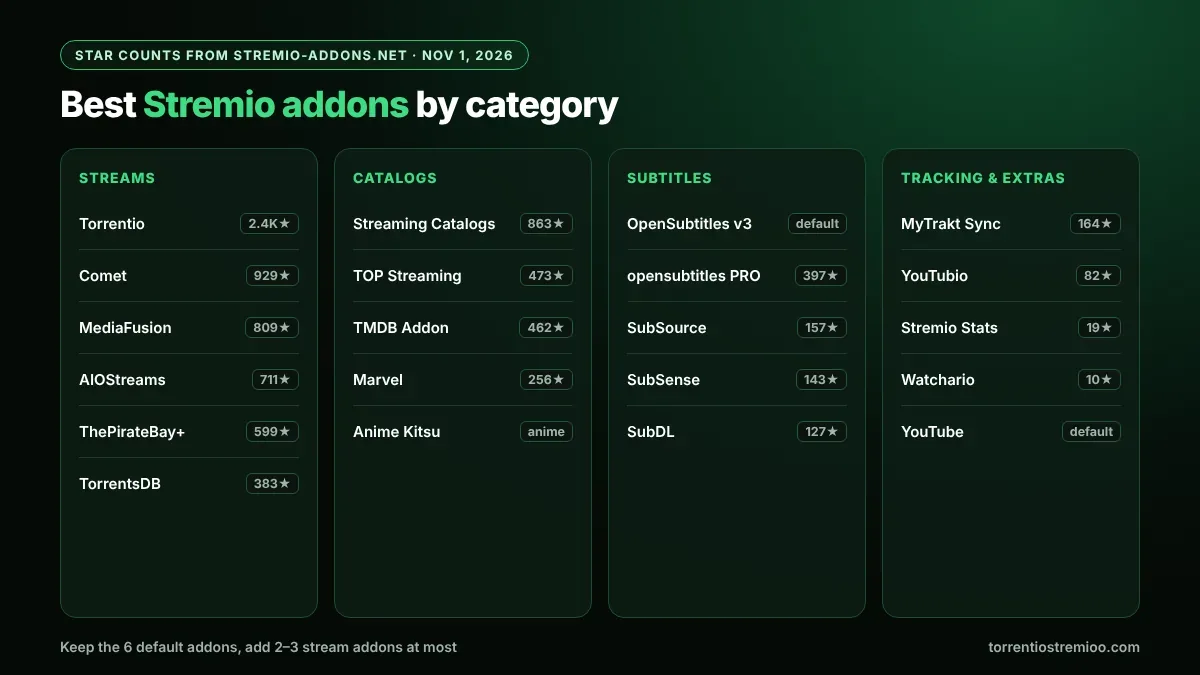
Stream addons are the most important Stremio addons, because the defaults give you no streams for most new movies and series. These are the six most-starred stream addons on stremio-addons.net:
| Addon | Stars | Version | Best for |
|---|---|---|---|
| Torrentio | 2.4K | 0.0.15 | Free torrent streams from 25 providers, works with or without debrid |
| Comet (ElfHosted) | 929 | 2.0.0 | Fast debrid search from many scrapers |
| MediaFusion (ElfHosted) | 809 | 6.2.0 | Universal torrent and debrid streams with detailed filters |
| AIOStreams (ElfHosted) | 711 | 2.37.0 | Merging several addons and debrid services into one list |
| ThePirateBay+ | 599 | 1.4.0 | Movies, series and anime from ThePirateBay |
| TorrentsDB | 383 | 1.0.0 | A Torrentio-style addon with extra Indian and European providers |
For most people, Torrentio alone is enough. It is free, needs no account and is the most popular of all Stremio addons by a wide margin. Learn how to set it up in our guide on how to install Torrentio on Stremio, then fine-tune it with the Torrentio configure guide.
Comparing stream addons in depth? Read our Torrentio vs Comet test and our full list of the best torrent addons for Stremio.
Best Stremio addons for catalogs and metadata
Catalog addons make the Board and Discover far more useful. Instead of one generic "Popular" list, you can browse what is trending on each streaming service, your favourite franchise or the top anime of the season.
| Addon | Stars | What it adds |
|---|---|---|
| Streaming Catalogs | 863 | Trending movies and series on Netflix, HBO Max, Disney+, Apple TV+ and more. You choose your services. |
| TOP Streaming | 473 | Top 10 lists from 48 streaming platforms in 93 countries |
| The Movie Database Addon | 462 | Rich TMDB metadata, multi-language catalogs, watchlists, ratings and IMDb integration |
| Anime Kitsu | n/a | Anime catalogs from Kitsu: Trending, Top Airing, Most Popular and Highest Rated (version 0.0.10) |
| Marvel | 256 | The whole Marvel catalog, with MCU and X-Men in viewing order |
Catalog Stremio addons do not provide streams themselves. They tell Stremio what to show, and your stream addon finds the video when you open a title.
Best Stremio addons for subtitles
OpenSubtitles v3 covers most popular titles. If you watch foreign films or need subtitles in a less common language, add one of these:
| Addon | Stars | Why use it |
|---|---|---|
| opensubtitles PRO | 397 | Ad-free and spam-free subtitles from OpenSubtitles |
| SubSource Subtitles | 157 | Unofficial addon for subtitles from SubSource.net |
| SubSense | 143 | Searches OpenSubtitles, SubDL, SubSource, AnimeTosho and more in one go |
| SubDL Subtitles | 127 | Subtitles from SubDL.com |
One or two subtitle addons are plenty. Then set your language once under Settings › Player › Default Subtitles Language. For syncing, custom .srt files and fixes, see our full Stremio subtitles guide.
Best Stremio addons for tracking and extras
| Addon | Stars | What it does |
|---|---|---|
| MyTrakt Sync (ElfHosted) | 164 | Your Trakt watchlists, collections, custom lists and calendar inside Stremio |
| YouTubio (ElfHosted) | 82 | YouTube subscriptions, Watch Later and history in Stremio |
| Stremio Stats | 19 | How many movies and hours you have watched, plus your favourite genres |
| Watchario | 10 | Syncs anime, movies and series with Trakt, Simkl, MDBList, AniList, MyAnimeList and Kitsu |
Stremio also has Trakt built in under Settings, so you only need a Trakt addon if you want your Trakt lists as catalogs.
Our top 5 picks explained
If you only read one part of this list, read this. These five addons cover what most people need:
Torrentio
The most popular stream addon, with 2.4K stars on stremio-addons.net. It searches 25 torrent providers, including anime and regional sources, and works free without any account. Add a debrid service later and the same addon shows cached streams that start in seconds. We tested it on a classic film and got 98 streams with the default settings.
Streaming Catalogs
Turns your Board into a mix of Netflix, HBO Max, Disney+ and Apple TV+ trending rows. You choose which services to show on its configure page. It does not stream anything itself, it simply helps you discover what is popular right now.
The Movie Database Addon
Replaces or complements Cinemeta with TMDB data: richer descriptions, catalogs in many languages, and optional links to your TMDB watchlist, IMDb ratings and MDBList. A great pick if you watch non-English content and want titles and descriptions in your own language.
opensubtitles PRO
An ad-free, spam-free subtitle addon based on OpenSubtitles. If the default OpenSubtitles v3 gives you subtitles with adverts inside them or poorly timed files, try this one first.
Anime Kitsu
Adds anime catalogs from Kitsu: Trending, Top Airing, Most Popular and Highest Rated. Pair it with Torrentio, which understands Kitsu IDs and searches anime providers such as NyaaSi, and you have a complete anime setup for free.
Best addons for specific situations
For Firestick and Android TV
The same addons work on a TV, but a short stream list matters more when you scroll with a remote. Install Torrentio with "max results per quality" set to 3 to 5, add Streaming Catalogs for easy browsing, and skip extra stream addons. Set everything up on your phone first so you never type links on the TV. Prefer a ready-made short list? Torrentio Lite shows one result per quality out of the box.
For non-English viewers
Set a priority language in Torrentio so releases in your language appear first, and use The Movie Database Addon for titles and descriptions in your own language. SubSense searches several subtitle sources at once, which helps with less common languages. For Brazilian Portuguese dubs, Brazuca Torrents (373 stars) is built on Torrentio's code with Brazilian providers, and TorrentsDB adds providers such as 1TamilMV and 1TamilBlasters for Indian content.
For debrid users
If you pay for Real-Debrid, TorBox or a similar service, add your key to Torrentio first. Then consider Comet as a backup: its public instance only works with debrid, but it pulls from many scrapers and can find extra cached files. AIOStreams is the power-user option, merging several addons and debrid accounts into one tidy list with detailed filters.
How to install Stremio addons (3 ways)
Installing Stremio addons takes less than a minute. Use whichever method suits the addon:
1. From the Addons menu
Open Addons in Stremio, switch from Installed to All, find the addon and press Install. This works for official addons and many community ones.
2. Paste the addon link
Every addon has a link that ends in manifest.json. Copy it from the addon's website, paste it into Stremio's Search or paste link bar (or Addons › Add addon) and press Install. Our Torrentio addon link guide explains how these links work.
3. Use the addon's configure page
Configurable addons such as Torrentio, Comet and Streaming Catalogs have a settings page. Choose your options, press Install, and your browser hands the link to the Stremio app. If nothing happens, press Copy Link and use method 2.
Because addons are saved to your account, install them once on a phone or computer and they appear on your TV too. This is the easiest way to add Stremio addons on a Firestick, where typing long links with a remote is painful. Our Firestick guide shows the full setup.
How to remove or update Stremio addons
- Remove: open Addons › Installed and press Uninstall on the addon card.
- Change settings: configure the addon again, install the new version, then uninstall the old one so results are not doubled.
- Share: use Share addon on the card to copy its link, but never share a link that contains a debrid API key.
Recommended Stremio addon setups
Not sure which Stremio addons to combine? Copy one of these starter setups:
| Setup | Addons to add (plus the defaults) |
|---|---|
| Free and simple | Torrentio, Streaming Catalogs |
| Debrid user | Torrentio with your debrid key, Comet as backup, Streaming Catalogs |
| Anime fan | Torrentio, Anime Kitsu, SubSense |
| Foreign films and subtitles | Torrentio with a priority language, opensubtitles PRO, SubSource |
| Trakt user | Torrentio, MyTrakt Sync, The Movie Database Addon |
Debrid services make streams start in seconds. If you want one, see our Real-Debrid guide or our TorBox guide.
How many Stremio addons should you install?
More is not better. Every stream addon you add is asked for links each time you open a title, so a long addon list means slower loading and longer, messier results. A good rule:
- Stream addons: two or three at most.
- Catalog addons: as many as you like, but each adds rows to the Board.
- Subtitle addons: one or two besides OpenSubtitles v3.
Stremio addons vs Kodi add-ons
If you come from Kodi, Stremio addons will feel much simpler. Kodi add-ons are zip packages that you install on each device, usually from third-party repositories, and you update them one by one. Stremio addons are just web links saved to your account: there is nothing to download, they update on the developer's side, and the same list appears on every device where you sign in. The trade-off is that Stremio depends on each addon's server being online. A few projects bridge both worlds; Comet, for example, also offers an official Kodi add-on.
Are Stremio addons safe?
Official Stremio addons are safe. Community Stremio addons are made by independent developers, so a little care goes a long way:
- Install from the addon's own website or a trusted catalog such as stremio-addons.net, never from random links in comments.
- Prefer open-source addons whose code is public, such as Torrentio and Comet.
- There are no Stremio addon APKs. Addons are web links, so any "addon APK" download is a red flag.
- Protect your debrid key. It lives inside the addon link, so treat that link like a password.
The content you watch is your responsibility, and laws differ by country. Our Torrentio safety guide covers privacy and VPN questions.
Do Stremio addons work on every device?
Yes. Because addons are saved to your Stremio account, the same list follows you to Windows, Mac, Linux, Android, Android TV, Fire TV, Stremio Web and the TV apps for Samsung, LG and others. There is one thing to keep in mind:
- Torrent streams need a streaming server. The desktop and Android apps include one. A web browser (and so Stremio Web on iPhone) does not, so torrent streams often fail there while debrid streams still play.
- Some addons need configuration first. Do it on a phone or computer, not with a TV remote.
- Other players can use them too. Apps such as Nuvio accept the same addon links that end in manifest.json.
How to find new Stremio addons
New addons appear every week. The easiest place to explore them is stremio-addons.net, which sorts addons into categories such as Movies & Series, Torrents, Usenet, HTTP Streams, Subtitles, Anime, Asian Drama, Bollywood, Debrid, Metadata and Tracking, with star counts from users. Before installing anything new, check three things:
- Stars and comments: a well-starred addon with recent comments is usually alive and trusted.
- Version and update date: an addon that has not changed in years may be broken.
- What it asks for: a subtitle or catalog addon has no reason to ask for your debrid key.
Stremio addons not working? Quick fixes
| Problem | Likely cause | Fix |
|---|---|---|
| No streams for a title | No stream addon installed, or filters too strict | Add Torrentio or loosen its quality filters |
| Addon missing on the TV | Different account on the TV | Sign in with the same account everywhere |
| Every result appears twice | Same addon installed twice | Uninstall the older copy |
| Addon fails to install | Wrong link or the addon is offline | Copy the link again and check it ends in manifest.json |
| Search stopped working | Cinemeta was removed | Reinstall Cinemeta from Addons › All |
| Results load slowly | Too many stream addons | Keep two or three and remove the rest |
If the whole app misbehaves, not just one addon, follow our Stremio not working checklist. Or compare Stremio alternatives if you want a different app.
Final words
The best Stremio addons are the ones you actually need. Keep the six defaults, add Torrentio for streams, pick one catalog addon and one extra subtitle addon, and stop there. You will have a fast, tidy Stremio that finds almost anything. Check back from time to time, because the community catalog of Stremio addons changes quickly.
Want the full picture? Read our complete Torrentio Stremio guide.
Frequently Asked Questions
What are the best Stremio addons?
For most people: Torrentio for streams, Streaming Catalogs or The Movie Database Addon for browsing, and opensubtitles PRO or SubSource for extra subtitles, on top of the six default addons such as Cinemeta and OpenSubtitles v3.
Are Stremio addons free?
Most Stremio addons are free, including Torrentio, Streaming Catalogs and the default addons. Some stream addons, such as the public Comet instance, only work with a paid debrid service.
How do I add addons to Stremio on Firestick?
Install the addon on your phone or computer while signed in to the same Stremio account. Addons sync to your account, so they appear on the Firestick automatically without typing long links with the remote.
How many Stremio addons should I install?
Keep the defaults and add two or three stream addons at most. Too many stream addons make results slower and longer. Catalog and subtitle addons can be added more freely.
Are Stremio addons safe to use?
Official addons are safe. For community addons, install only from the addon website or a trusted catalog such as stremio-addons.net, prefer open-source projects and never share links that contain a debrid API key.
Why do my Stremio addons show no streams?
Usually because no stream addon is installed, or its quality filters are too strict. Add Torrentio, check its settings, and make sure you are signed in to the same account on every device.